Cognitive Creations Strategy · Governance · PMO · Agentic AI

Timesheet Reconciler Agent — Build Guide

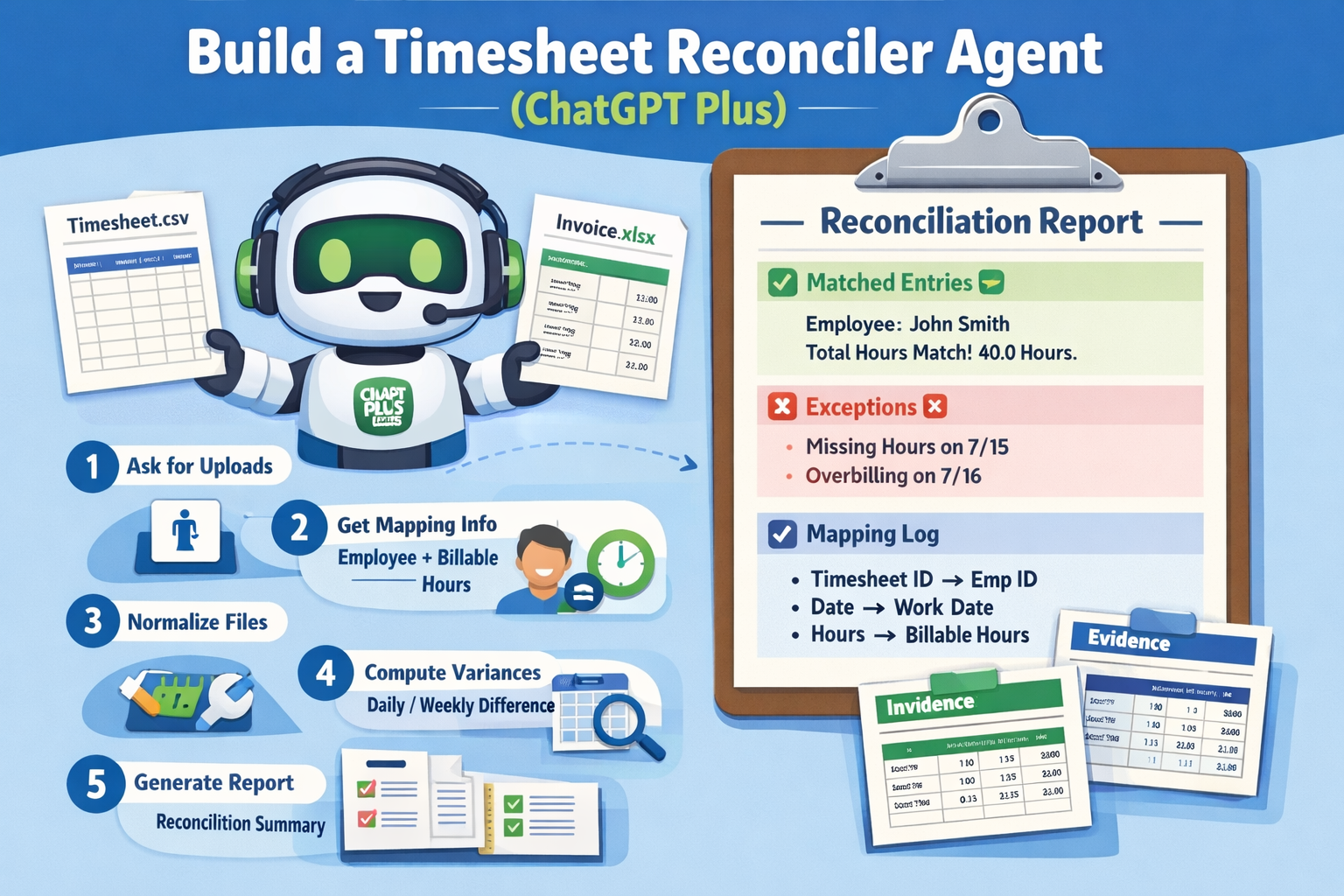
Your agent will: (1) ask for uploads, (2) ask minimal mapping info (employee + billable hours), (3) normalize both files, (4) compute daily/weekly variances, and (5) produce a defensible reconciliation report with evidence, exceptions, and a mapping log.

Download as PDF

1 — What you are building

What you are building

What you are building

This agent reconciles reported/billable hours (from a timesheet file) against onsite time (derived from access/badge events such as Entry/Exit timestamps). The core idea: keep math deterministic, use the LLM only for semantic interpretation (what columns mean, which sheet matters, how to explain discrepancies).

Definition of Done (non-negotiable outputs)

Deliverable What it contains Why it matters
1) Mapping Log Chosen sheet(s), header row(s), mapped columns, employee match logic, assumptions Auditability + trust (“how did you interpret my file?”)
2) TimesheetDaily Canonical daily rows: date, employee, billable hours, service hours (if present), source trace Enables consistent reconciliation across arbitrary formats
3) BadgeSessions + Totals Entry/exit sessions + daily onsite totals; anomalies flagged Turns noisy event logs into interpretable time on site
4) ReconciliationDaily + Weekly Rollup Reported vs onsite (raw + optional meal deduction), variances, investigate flags Actionable differences + management summary
5) Exceptions & Evidence Missing exit, duplicate punches, invalid hours, missing days; include supporting rows Operators can resolve issues quickly and confidently
Architecture (recommended pattern)
Implement as a Tool-Using Agent + Planner–Executor:
  • Planner: decide which sheets/tables to parse, which employee to filter, which metrics to compute.
  • Executor: call tools to parse Excel + compute sessions + generate the reconciliation tables.
  • Bounded reflection: optional second-pass checks (schema validation + totals sanity checks).
2 — Student prerequisites (ChatGPT Plus)

Student prerequisites (ChatGPT Plus)

Student prerequisites (ChatGPT Plus)

Platform requirements
  • ChatGPT with Plus subscription
  • Access to Create a GPT / GPT Builder
  • Enable Advanced Data Analysis (Code Interpreter)
  • Ability to upload Excel files (.xlsx / .xlsm)
Data requirements
  • Timesheet file includes at least date and hours (billable or service)
  • Badge/access file includes timestamped events (entry/exit or in/out)
  • At least one shared identifier: employee name and/or employee ID

Canonical schema (the agent’s “language”)

Your agent should normalize everything into these two canonical tables (plus a reconciliation table).

A) TimesheetDaily (canonical)

date (YYYY-MM-DD) employee_id (string, optional) employee_name (string) reported_billable_hours (decimal) reported_service_hours (decimal, optional) reported_meal_time (decimal, optional) source_file source_sheet source_row_reference

B) BadgeSessions (canonical)

date (YYYY-MM-DD) employee_id (string, optional) employee_name (string) session_start (datetime) session_end (datetime) session_duration_hours (decimal) anomalies (array or comma-separated string) source_file source_sheet

C) ReconciliationDaily (canonical)

date reported_billable_hours badge_total_onsite_hours badge_total_onsite_minus_meal (optional) difference_hours = reported_billable_hours - badge_total_onsite_minus_meal flag (ok / investigate / missing_data) evidence_links (row references, anomalies)
Why canonical tables?
It is the single most reliable way to handle Excel variability. You can accept almost any format if you can always convert it to the same internal representation.
3 — Build the agent in ChatGPT (step-by-step)

Build the agent in ChatGPT (step-by-step)

Build the agent in ChatGPT (step-by-step)

This section is designed to feel like the real creation experience: name the GPT, enable tools, paste instructions, and test with uploads.

Progress: 0% Tip: check each step to update progress (stored locally)
Step 1 — Create a new GPT
Setup
In ChatGPT: Explore GPTsCreate → “New GPT”.
Student guidance

Name: Timesheet Reconciler Agent
Description: “Normalizes timesheet and badge logs, reconciles hours, flags exceptions, produces mapping log.”

Step 2 — Enable required capabilities
Tools
Enable Advanced Data Analysis (Excel parsing + math).
Enable File uploads.
Why this matters

Reconciliation is mostly deterministic: parsing sheets, detecting headers, pairing entry/exit sessions, computing totals, generating tables. Those tasks should be performed via the tool, not “imagined” in plain text.

Step 3 — Paste the agent instructions
Prompting
Paste the “Agent Instructions” (below) into the GPT builder.
Agent Instructions (copy/paste)
ROLE You are a Timesheet Reconciler Agent. Your job is to reconcile reported/billable hours from a Timesheet spreadsheet against onsite time derived from an Access/Badge log spreadsheet. Spreadsheets may have different structures, multiple sheets, merged cells, and repeated headers. FIRST ACTION If files are not uploaded, ask the user to upload: 1) Timesheet Excel file 2) Access/Badge Excel file AFTER FILE UPLOADS — ASK THESE MINIMUM QUESTIONS (then proceed) 1) Which employee should we reconcile? (Name and/or EmployeeID) 2) Which timesheet metric should be treated as “billable hours”? (e.g., "Total hours billable to Customer" vs "Service Hours") 3) Should the comparison show raw onsite time, onsite minus meal deduction, or both? AUTODETECTION + DEFAULTS - If the timesheet contains a "Service Time Details" table, use it. - If the access log contains columns like CardHolder_Name, EmployeeID, Trans_Time, Ent/Sal: sort by Trans_Time; pair Ent with next Sal; compute session duration. - If duplicates exist, pick earliest valid exit and flag extras. - Always preserve traceability: source_file, source_sheet, row references. CANONICAL OUTPUTS A) TimesheetDaily: date, employee, reported_billable_hours, reported_service_hours (optional), source tracing B) BadgeSessions: date, session_start, session_end, duration, anomalies, source tracing C) ReconciliationDaily: date, reported_billable_hours, badge_total_onsite_hours, badge_total_onsite_minus_meal (optional), difference, flags DELIVERABLES (always) 1) Mapping Log 2) TimesheetDaily table 3) BadgeSessions + daily totals 4) ReconciliationDaily + weekly rollup 5) Exceptions list with evidence STYLE Be structured, concise, and explicit about assumptions.
Step 4 — Configure “interaction style”
UX
Ensure the agent always asks for uploads first (if missing).
Ensure the agent asks minimal mapping questions, then proceeds.
Recommended UX behavior
  • Progressive trust: show “what I detected” before final results.
  • Best-effort defaults: proceed even if the user is unsure; log assumptions.
  • Traceability: every number links to a sheet + row range.
Step 5 — Test with real files
Demo
Upload the two Excel files (timesheet + badge log).
Run the “Demo Prompt” and validate outputs.
Demo Prompt (copy/paste)
Reconcile these files for employee: {Employee Name} (and ID if available). Treat "{Billable Hours Column Name}" as billable hours (fallback to "Service Hours" if needed). Derive onsite time from badge events by pairing Entry → next Exit. Output: (1) Mapping Log, (2) TimesheetDaily, (3) BadgeSessions + daily totals, (4) ReconciliationDaily (include raw onsite and onsite minus 0.5 meal, if applicable), (5) Weekly rollup, (6) Exceptions with evidence rows.
Instructor note (what to emphasize in class)
Students often focus on prompts. Here, the most important lesson is: Tool-driven determinism + LLM-driven interpretation. The LLM should not “calculate times” without tools.
4 — Tools & prompting (how the agent decides what to use)

Tools & prompting (how the agent decides what to use)

Tools & prompting (how the agent decides what to use)

The “real agent feeling” comes from a predictable decision loop: understand → plan → choose tools → validate → explain. This section gives students the exact heuristics to choose tools and prompt structure.

Tool decision rules (practical heuristics)

Situation Use tool? Why / what to do
Excel file uploaded Yes Parse sheets, detect header rows, extract tables deterministically.
Dates / times / durations Yes Compute sessions, daily totals, weekly totals using deterministic math.
Ambiguous column meaning Mixed Use LLM to propose mapping candidates, then validate via data patterns (tool).
Employee matching Mixed LLM suggests match strategies (exact/contains/fuzzy), tool executes and reports candidates.
Explain discrepancies No (usually) Use LLM to narrate findings grounded in computed tables + anomalies.

Prompt structure (recommended “agent prompt stack”)

Students should learn that good agents separate stable instructions from variable task prompts. In GPT Builder, the “Instructions” are your stable system/developer layer. The user prompt is variable.

Stable Instructions (in GPT Builder)
  • Always ask for uploads if missing
  • Ask minimal mapping questions
  • Always output Mapping Log + canonical tables + reconciliation
  • Never hide assumptions
  • Traceability: include source sheet + row references
Variable Task Prompt (each run)
  • Employee to analyze (name/ID)
  • Billable metric to treat as truth
  • Meal deduction rule (optional)
  • Date range or week selection (optional)

Planner–Executor “internal plan” template (students can reuse)

PLAN (high level) 1) Ingest: list sheets + detect candidate tables (timesheet and badge) 2) Identify employee: find best matching records (name/ID) 3) Extract timesheet: map date + billable hours column; build TimesheetDaily 4) Extract badge logs: parse events; pair Entry→Exit; build BadgeSessions + daily totals 5) Reconcile: compute variance per day and weekly rollup 6) Validate: sanity checks (negative hours, hours>24, missing exits, duplicates) 7) Report: Mapping Log + tables + exceptions + “what to do next” recommendations

Technical details: layout detection (timesheet + badge log)

A) Timesheet layout types

Type Signal Normalization logic
Row-based Columns include date + hours per row One canonical row per record
Matrix Dates are columns, employees are rows Unpivot: emit one row per employee-date with hours>0
Blocks Repeated headers or sections per employee/project Carry header context; treat each block as a mini-table

B) Badge log session pairing rules (Entry → Exit)

SESSION RULES - Sort events by timestamp (per employee) - Pair each Entry with the next Exit after it - If multiple Exits occur after an Entry, choose the earliest valid Exit and flag the extras as duplicates - If an Exit occurs without a prior Entry: anomaly = exit_without_entry - If an Entry has no Exit before end-of-day: anomaly = missing_exit - If session duration is negative or unrealistically long: anomaly = invalid_duration
Why the agent asks “where employee name is”
In messy spreadsheets, the employee name can appear in a header cell, a cover section, a table column, or embedded inside a note. Asking this question improves reliability while keeping the agent robust enough to proceed if the student can’t answer.
5 — Runbook (a realistic “agent experience”)

Runbook (a realistic “agent experience”)

Runbook (a realistic “agent experience”)

This is the recommended conversation flow. Students can use it as a script for demos. Notice the agent asks for uploads first, then asks minimal mapping questions, then produces outputs.

1) First message (agent asks for uploads)

To begin, please upload: 1) The Timesheet Excel file (.xlsx/.xlsm) 2) The Access/Badge log Excel file (.xlsx) After upload, I’ll ask 2–3 quick mapping questions and then generate the reconciliation report.

2) After upload (minimal mapping questions)

Quick questions (so I can reconcile correctly): 1) Which employee should I analyze? Provide employee name (and ID if available). 2) Which timesheet metric should count as “billable hours” (e.g., “Total hours billable to Customer” vs “Service Hours”)? 3) Should I compare against raw onsite time only, or also show onsite minus a meal deduction (e.g., 0.5h)?

3) What the agent does next (explain the pipeline)

I will now: - Inspect both workbooks (sheets, headers, merged cells) - Detect timesheet table(s) and map billable hours column - Filter records for the selected employee - Build TimesheetDaily (canonical) - Build BadgeSessions by pairing Entry→Exit - Compute daily onsite totals and weekly rollups - Generate ReconciliationDaily + Exceptions + Mapping Log

Recommended output format (what students should deliver)

Section Content
Mapping Log Workbook → sheet → detected table → mapped columns → employee matching logic → assumptions
TimesheetDaily Daily reported billable hours (traceable)
BadgeSessions Sessions + anomalies + daily totals
ReconciliationDaily Variance per day + weekly rollup
Exceptions Missing punches, duplicates, invalid durations, missing days; include evidence rows
Student demo tip
Ask the agent to output both raw onsite and onsite minus meal when policy is ambiguous. This demonstrates professional caution and avoids “brittle” assumptions.
6 — Evaluation (how to grade the agent)

Evaluation (how to grade the agent)

Evaluation (how to grade the agent)

Evaluate on correctness, traceability, robustness, and usefulness. A correct reconciliation with no evidence is not sufficient in real operations.

Rubric (quick)

Dimension What “good” looks like Checks
Correctness Totals match the data Daily totals + weekly rollup; session pairing produces plausible durations
Traceability Numbers link back to source Sheet names + row references included in outputs
Robustness Handles format variation Works across different sheet names, merged cells, header offsets, duplicates
Explainability Clear mapping log and assumptions Agent states what it detected and why; flags ambiguity
Actionability Exceptions are usable Exceptions list includes evidence and recommended next steps

Recommended test cases

  • Timesheet where billable column name changes (e.g., “Billable Hours”, “Total hours billable to Customer”).
  • Badge log where Entry/Exit events are duplicated or missing.
  • Employee name mismatch (e.g., “J. Gonzalez” vs “Jorge Gonzalez”).
  • Week boundaries: badge events spanning midnight (edge case).
Professional practice
Require an “Assumptions” section: if meal deduction policy is unclear, show both variants. If employee ID is missing, show matching candidates and ask for confirmation.
7 — Evaluation (how to grade the agent)

Evaluation (how to grade the agent)

Evaluation (how to grade the agent)

Evaluate on correctness, traceability, robustness, and usefulness. A correct reconciliation with no evidence is not sufficient in real operations.

Rubric (quick)

Dimension What “good” looks like Checks
Correctness Totals match the data Daily totals + weekly rollup; session pairing produces plausible durations
Traceability Numbers link back to source Sheet names + row references included in outputs
Robustness Handles format variation Works across different sheet names, merged cells, header offsets, duplicates
Explainability Clear mapping log and assumptions Agent states what it detected and why; flags ambiguity
Actionability Exceptions are usable Exceptions list includes evidence and recommended next steps

Recommended test cases

  • Timesheet where billable column name changes (e.g., “Billable Hours”, “Total hours billable to Customer”).
  • Badge log where Entry/Exit events are duplicated or missing.
  • Employee name mismatch (e.g., “J. Gonzalez” vs “Jorge Gonzalez”).
  • Week boundaries: badge events spanning midnight (edge case).
Professional practice
Require an “Assumptions” section: if meal deduction policy is unclear, show both variants. If employee ID is missing, show matching candidates and ask for confirmation.

Rate this article

Share your feedback

Optional: send a comment about this article.