Cognitive Creations Strategy · Governance · PMO · Agentic AI

Enterprise RAG Agent — Production Blueprint

Hero — What this banner represents

Download as PDF

1 — Executive Overview

Executive Overview

Executive Overview

RAG succeeds in enterprises when it is treated as a governed knowledge system, not as a one-time embedding job. The production difference is operational: document lifecycle, delta ingestion, freshness ranking, access control, observability, and evaluation gates.

What this blueprint gives you
  • A serious use case with enterprise readiness assumptions
  • A phased build plan with concrete technical steps
  • A maintenance framework (healthy RAG) with cadence and controls
  • Evaluation metrics, golden sets, and operational gates
What typically breaks after the demo
  • No incremental updates → stale answers
  • No lifecycle states → deprecated docs still rank high
  • No ACL → cross-team data leakage risk
  • No evaluation → quality silently degrades

Vector DB options (prototype → enterprise)

Option When it fits best Notes
Pinecone Managed scaling, minimal ops Strong managed experience; cost scales with usage. Excellent for enterprise production if budgeted.
Qdrant (cloud free / self-host) Serious prototype, low ops Great for prototyping quickly; can self-host later. Good performance and filtering support.
Chroma (self-host) Local/VPS prototypes Very fast to start; best when you want full control and can manage deployment yourself.
pgvector (Postgres) “Everything in one DB” Best if you already run Postgres and want simplified ops; strong for structured + vector combos.
2 — Use Case: AI Knowledge Agent for Policies, SOPs & Project Delivery

Use Case: AI Knowledge Agent for Policies, SOPs & Project Delivery

Use Case: AI Knowledge Agent for Policies, SOPs & Project Delivery

Problem

Enterprise knowledge is fragmented across PDFs, SharePoint/Confluence, internal portals, and ticket systems. People lose time searching, and critical decisions get made using outdated guidance.

Solution

A RAG-based agent that answers questions using only approved internal evidence, returns citations, respects access control, and abstains when evidence is insufficient.

Example questions (realistic)
  • “What is the approval process for EPICs and who must sign off?”
  • “Which controls are mandatory for deploying AI agents in production?”
  • “Where is the latest Project Charter template and how do we fill it?”
  • “What is the current data retention policy for customer files?”
Business outcomes
Faster onboarding Reduced search time Lower compliance risk Auditable answers
Enterprises adopt RAG when the system can produce evidence trails that survive audit and stakeholder scrutiny.
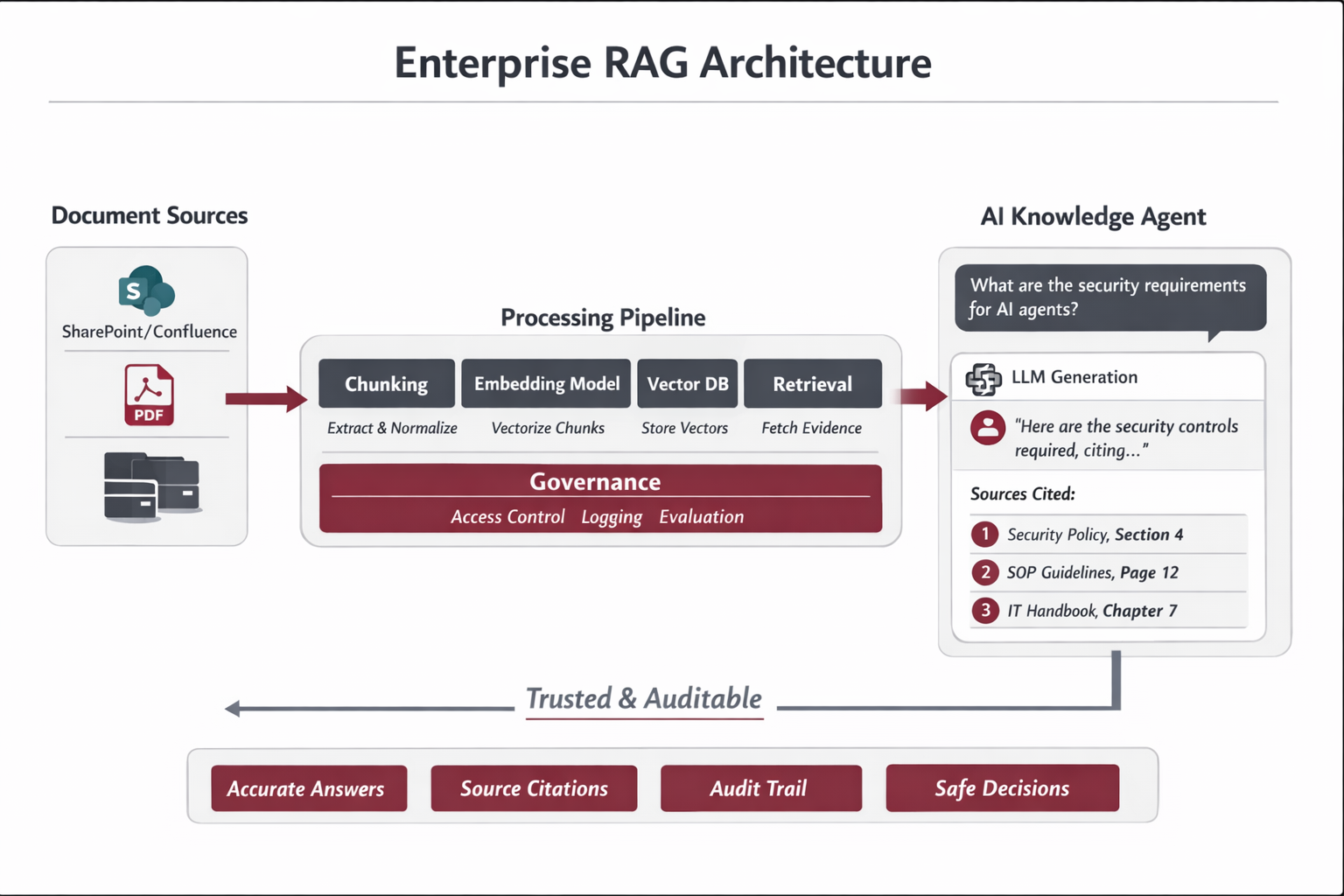
Enterprise RAG Architecture Overview diagram

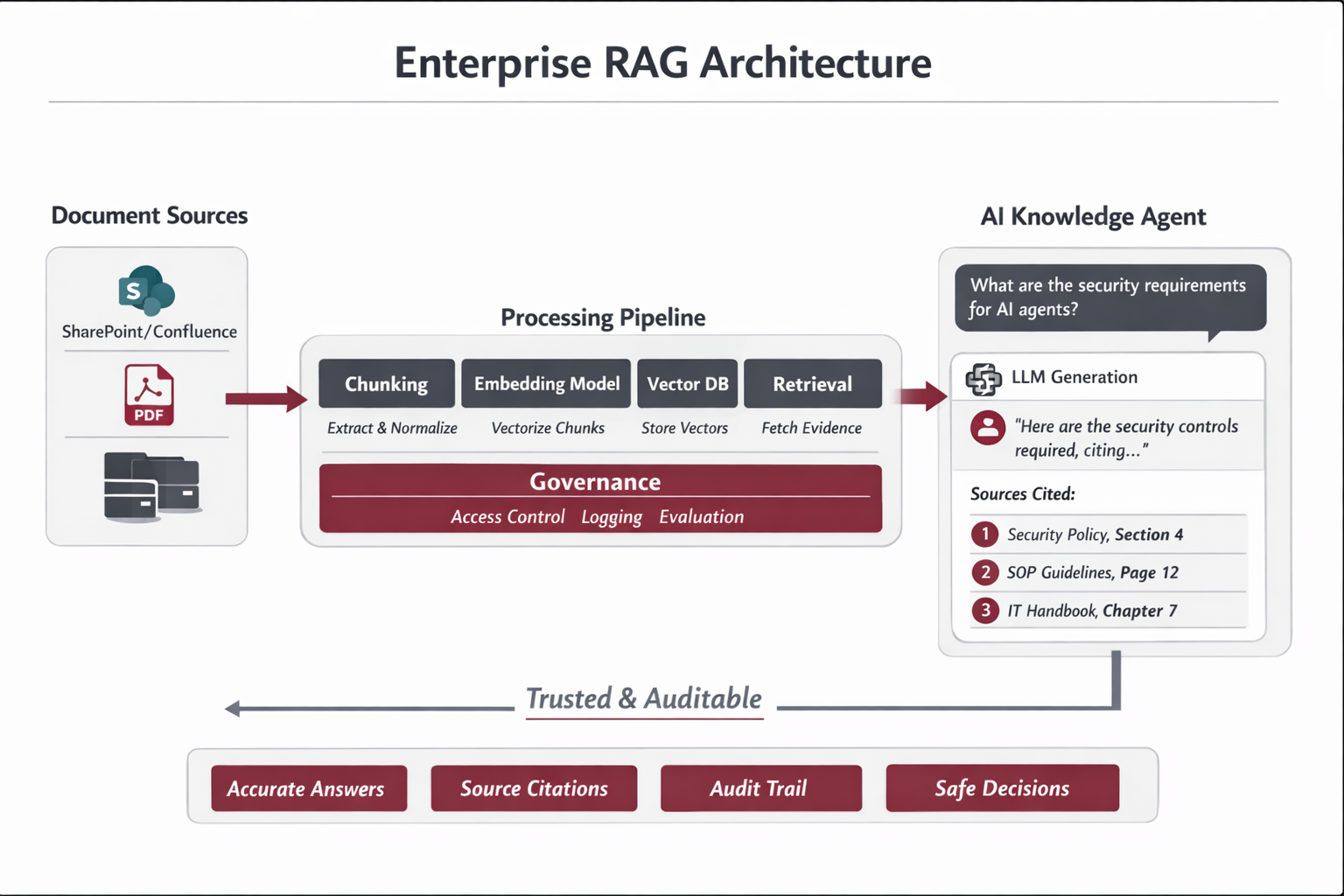
Figure — Enterprise RAG Architecture Overview

A system view (not a prompt): ingestion → registry → chunking → embeddings → vector store → retrieval with filters → grounded answer with citations. The “ops layer” includes logging, evaluation, and lifecycle controls.

3 — Reference Architecture (Enterprise-Grade)

Reference Architecture (Enterprise-Grade)

Reference Architecture (Enterprise-Grade)

Core layers

Layer Responsibility Production notes
Sources SharePoint, Confluence, PDFs, portals Connector must capture doc_id, last_modified, owner, ACL tags.
Normalization Clean text + structure Strip headers/footers, preserve headings, handle tables carefully.
Chunking Split into retrievable units Use profiles by doc type; keep stable chunk IDs for versioning.
Embeddings Vector representation Batching, retries, cost controls; embed version tracked in registry.
Vector DB Store vectors + metadata Namespaces/collections per tenant or domain; support metadata filtering.
Retrieval Top-k + filtering + ranking Apply ACL filters; freshness boosts; deprecation penalties; thresholds.
Generation Grounded answers “Evidence-only” policy; citations; abstain if evidence weak.
Ops & Governance Logs + eval + lifecycle Audit trails (retrieved chunks, versions), continuous evaluation and alerts.

Metadata contract (mandatory)

Production RAG requires a strict metadata contract. If content cannot be governed (owner/version/status/ACL), it should not be indexed.

{ "doc_id": "SEC-POL-012", "source_uri": "sharepoint://security/policies/SEC-POL-012.pdf", "title": "AI Agent Security Controls", "doc_type": "policy", "version": "3.2", "status": "Active", "owner": "Security", "last_modified_at": "2025-11-02T18:11:00Z", "effective_from": "2025-11-10", "effective_to": null, "access_tags": ["Security","IT","GRC"], "checksum": "sha256:....", "chunking_profile": "policy_v1", "embed_model": "text-embedding-3-large", "tenant_id": "internal" }
Ingestion and normalization pipeline diagram

Figure — Ingestion & Normalization Pipeline

Connectors produce a document manifest (IDs, timestamps, ACL tags). Normalization outputs structured text preserving headings. Registry compares checksums to determine delta ingestion.

4 — End-to-End Control Model (Production): Originals → Chunking → Embeddings → Vector DB → Updates/Deletions

End-to-End Control Model (Production): Originals → Chunking → Embeddings → Vector DB → Updates/Deletions

End-to-End Control Model (Production): Originals → Chunking → Embeddings → Vector DB → Updates/Deletions

Enterprise principle
A RAG system does not “own” original files. It reflects systems-of-record (SharePoint, Confluence, Drive, CMS). The indexing pipeline is a governed mirror: automated by triggers/jobs, supervised by owners and ops, and fully auditable.

1) What is chunk.text (and what it is not)

What it is
  • Human-readable text (a string) representing the meaning of a portion of the source.
  • Extracted/transcribed/OCR’d from the original, then normalized (remove headers/footers, preserve headings, clean bullets).
  • The retrieval unit you embed, store, retrieve, and cite.
What it is not
  • Not a byte-for-byte representation of a PDF/DOCX/PNG/MP4.
  • Not raw binary, not pixels, not audio frames.
  • Vector DB is not file storage; originals remain in the source repository.
Example chunk record (conceptual): { "chunk_id": "SEC-POL-012:3.2:0007", "text": "Section 4.2 — Access Control Requirements ...", "metadata": { "doc_id": "SEC-POL-012", "version": "3.2", "section": "Access Control", "status": "Active", "access_tags": ["Security","IT","GRC"], "source_uri": "sharepoint://.../SEC-POL-012.pdf#page=14" } }

2) Chunking: how chunks are created (tools + profiles + rules)

Chunking is one of the strongest quality levers. Production chunking preserves structure (headings, steps, tables), uses controlled chunking profiles, and assigns stable identifiers for updates and auditability.

2.1 Practical tool stack

Source type Extraction approach Chunking approach
PDF (native text) Unstructured / PyMuPDF / pdfplumber Heading-aware + token cap (profile-based)
DOCX docx parser (e.g., python-docx) / Unstructured Section-aware + keep lists intact
HTML / Wiki HTML parser (e.g., BeautifulSoup) Split by H2/H3 + token cap
Scanned PDFs / Images OCR (Azure Vision / Google Vision / Tesseract) Chunk by paragraphs/blocks + page metadata
Audio/Video Speech-to-text transcription Chunk by topic/time window + timestamps

2.2 Chunking profiles (controlled evolution)

Profiles prevent random tweaks. You only change chunking through versioned profiles, then measure impact via evaluation gates.

Profile Target docs Chunk size Hard rules
policy_v1 Policies 600–900 tokens Keep headings + definitions together; overlap 10–15%; avoid splitting obligations mid-list.
sop_v1 SOPs 400–700 tokens Keep steps intact; keep numbered sequences; overlap ~10%; preserve “inputs/outputs” blocks.
faq_v1 FAQs 200–400 tokens One Q + one A per chunk; minimal overlap; maximize precision.
tech_v1 Technical docs Variable Never split code blocks; split by headings; keep config tables as a single block (markdown).
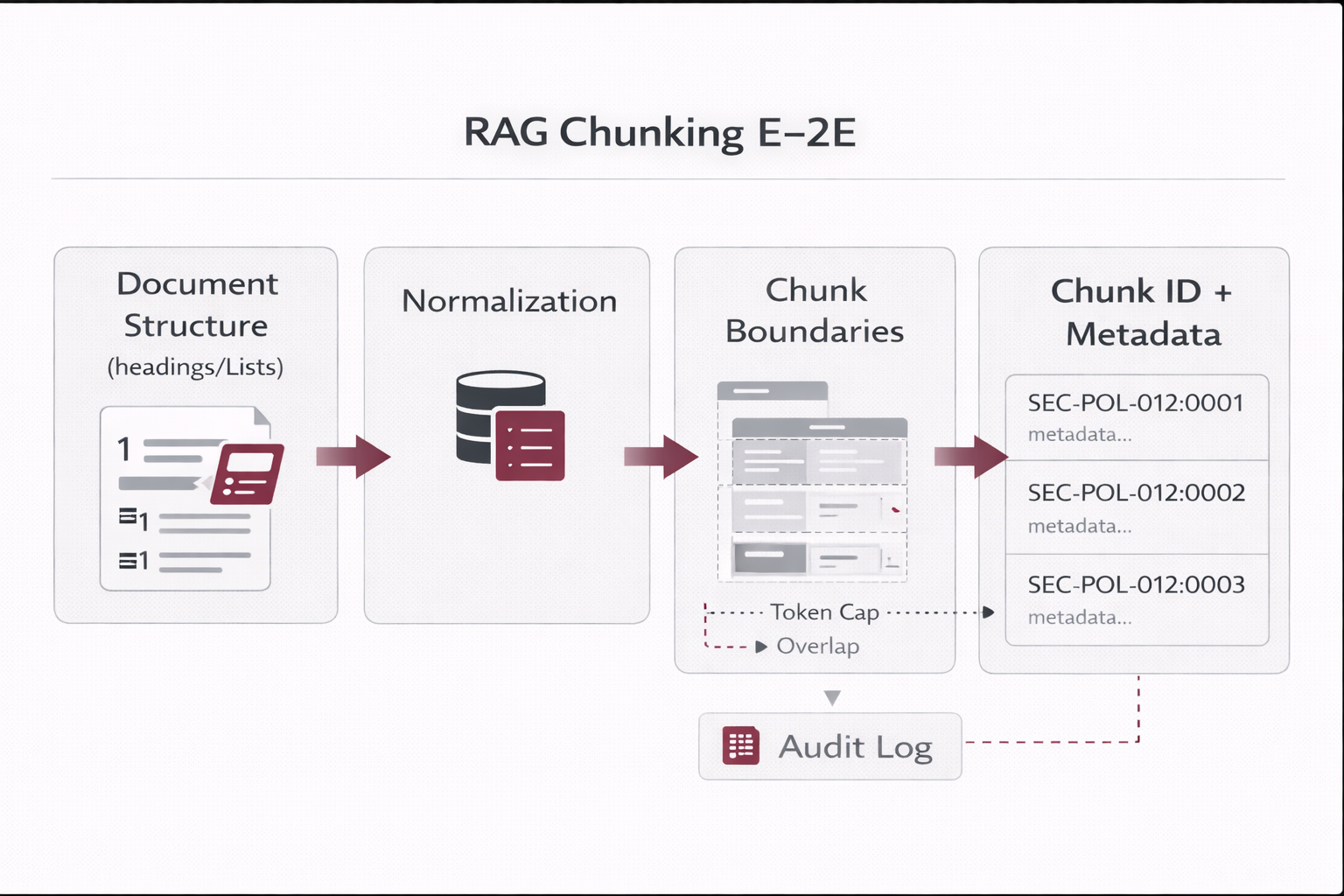
Chunking end-to-end blueprint (structure → chunks → IDs → metadata)

Figure — Chunking Blueprint

Normalized structure → chunk boundaries → stable chunk IDs + metadata contract required for governance and updates.

3) Embeddings & Vector DB: who stores what (and where)

Critical clarification
The embedding model does not store your chunks. It only returns a vector. Your indexing service/job performs the upsert into the Vector DB using its SDK/API.
Indexing flow (conceptual): 1) chunk.text → embedding_model → vector 2) vector_db.upsert( id=chunk_id, vector=vector, payload={ text, metadata } )

3.1 What lives where

Asset System of record Why
Original files (PDF/DOCX/PNG/MP4) SharePoint/Drive/CMS/Object storage Retention, enterprise ACLs, audit/legal, click-through to source.
Registry (doc lifecycle, checksums, config) Relational DB (MySQL/Postgres) Operational truth for delta ingestion, retries, rollbacks, reproducibility.
Vectors + chunk payload Vector DB (Qdrant/Pinecone/Chroma/pgvector) Fast semantic retrieval + metadata filtering (ACL, lifecycle, tenant).
Traces & feedback Relational DB / log store Audit trail, debugging, continuous evaluation, governance evidence.
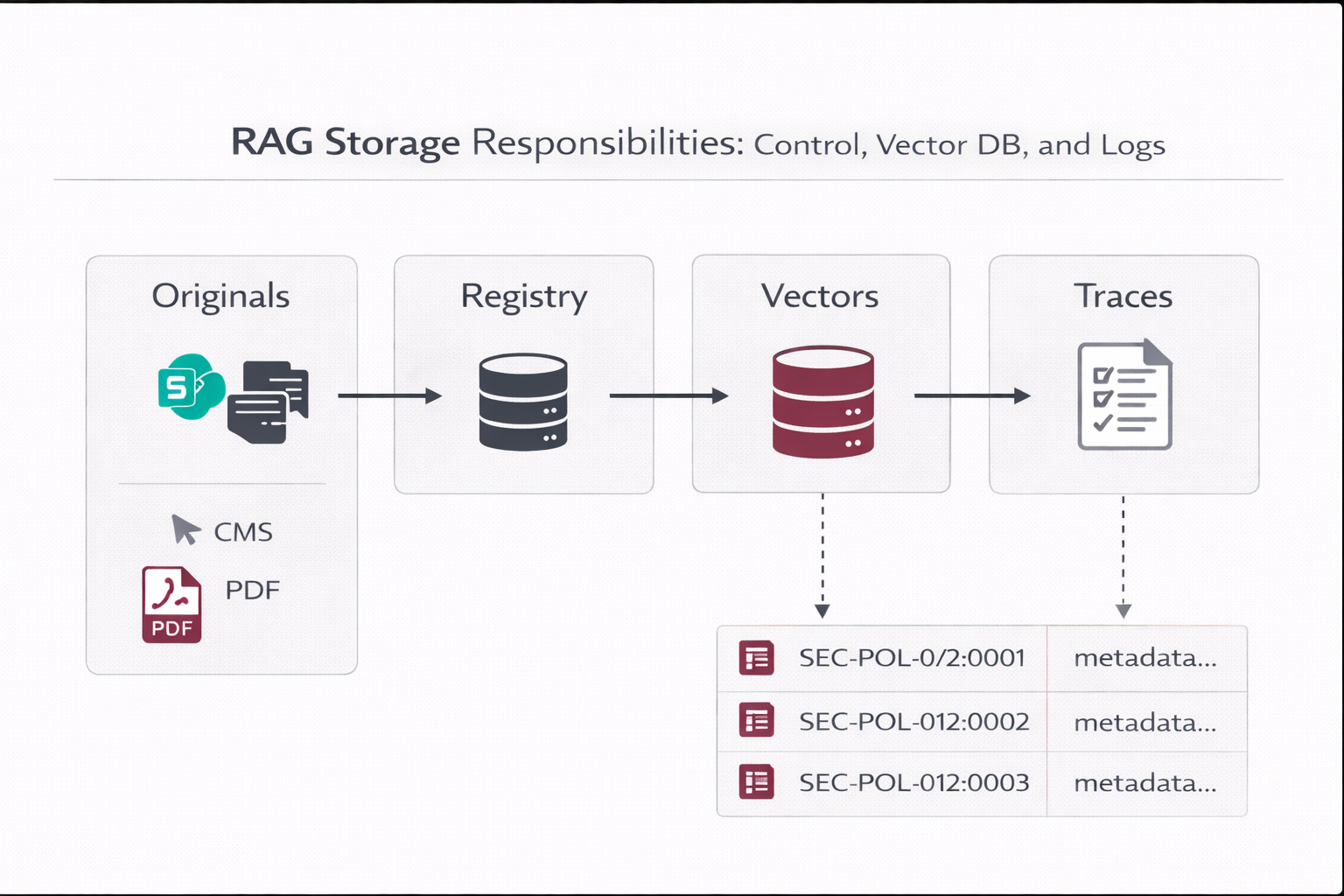
Where originals vs registry vs vectors vs traces are stored

Figure — Storage Responsibilities

Separation of concerns: originals in source systems; registry in relational DB; vectors in vector store; traces for audit and evaluation.

4) Updates & deletions: delta ingestion, tombstones, and hard deletes

4.1 Delta ingestion (healthy updates without reindex-all)

  • Connectors collect a manifest: doc_id, last_modified_at, source_uri, access_tags.
  • Compute a checksum (hash) of normalized content (optionally per section).
  • Compare to the registry; process only: new, changed, deleted.
  • Upsert new vectors; mark old chunks tombstoned when versions change.
  • Record index_state and errors for automated retries.
Why checksum matters
It prevents accidental “reindex all,” controls cost, and keeps indexing pipelines predictable.

4.2 Versioned IDs (find, update, and rollback)

Recommended ID strategy: doc_id = stable identifier (SEC-POL-012) doc_version = semantic or timestamp (3.2 or 2025-11-02T18:11Z) chunk_id = doc_id + ":" + doc_version + ":" + chunk_seq Examples: SEC-POL-012:3.1:0007 (older) SEC-POL-012:3.2:0007 (newer)

4.3 What happens when a physical file is deleted?

The correct approach is automated and governed. People decide lifecycle and ownership; systems execute the pipeline. Deletion is detected via webhooks or polling, then applied as a soft delete (tombstone) followed by controlled hard delete.

Step System action (automated) Outcome
1 Detect deletion: event (e.g., file.deleted) OR polling sees doc missing Registry marks doc as Retired / PENDING_DELETE
2 Apply tombstones: find chunks by doc_id and set is_deleted=true (or status Retired) RAG stops retrieving that content immediately
3 Hard delete window (weekly/monthly): physically delete tombstoned vectors Storage cleanup + governance-compliant retention
4 Audit record: log who/when/source/what (traceability) Defensible evidence trail for compliance
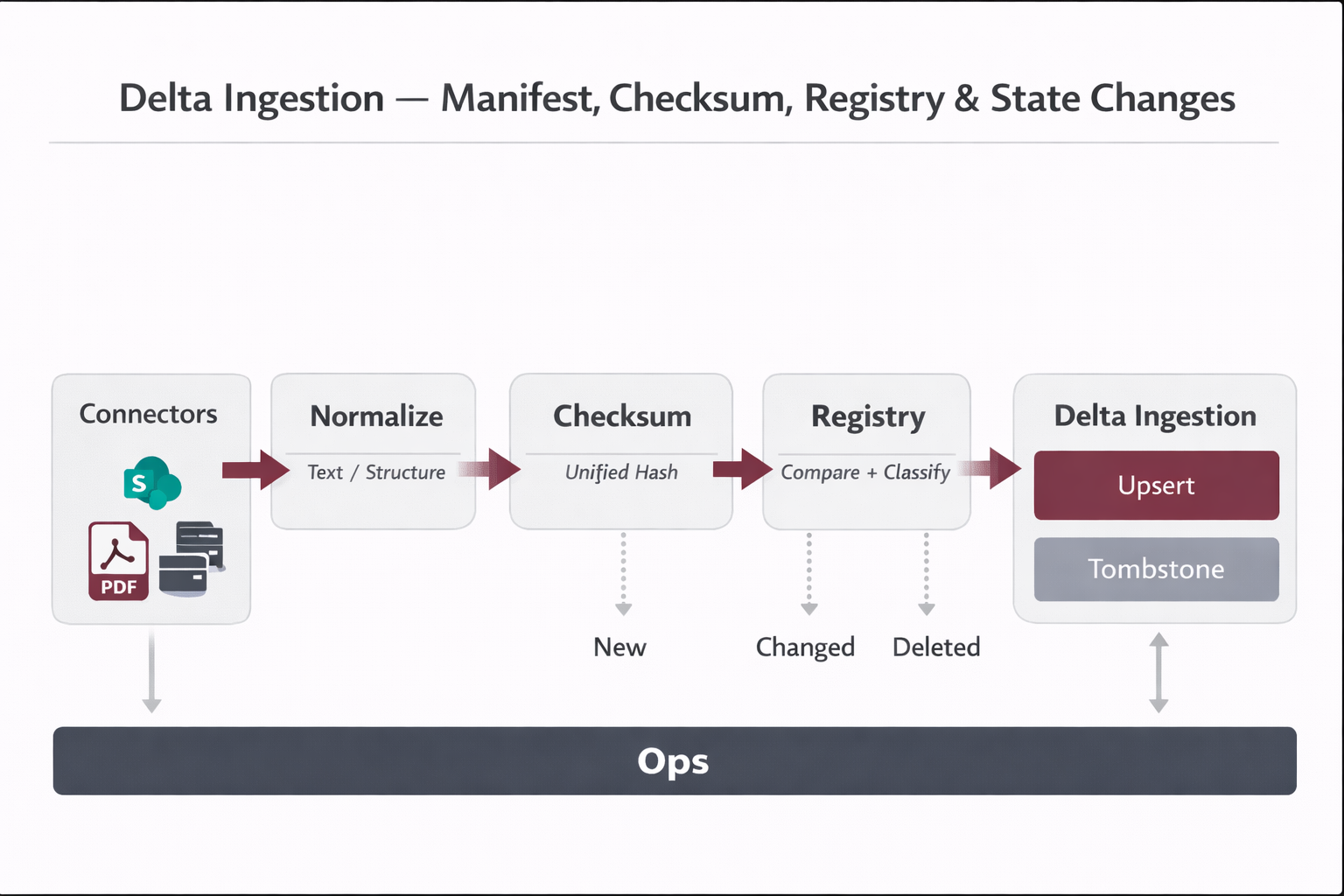
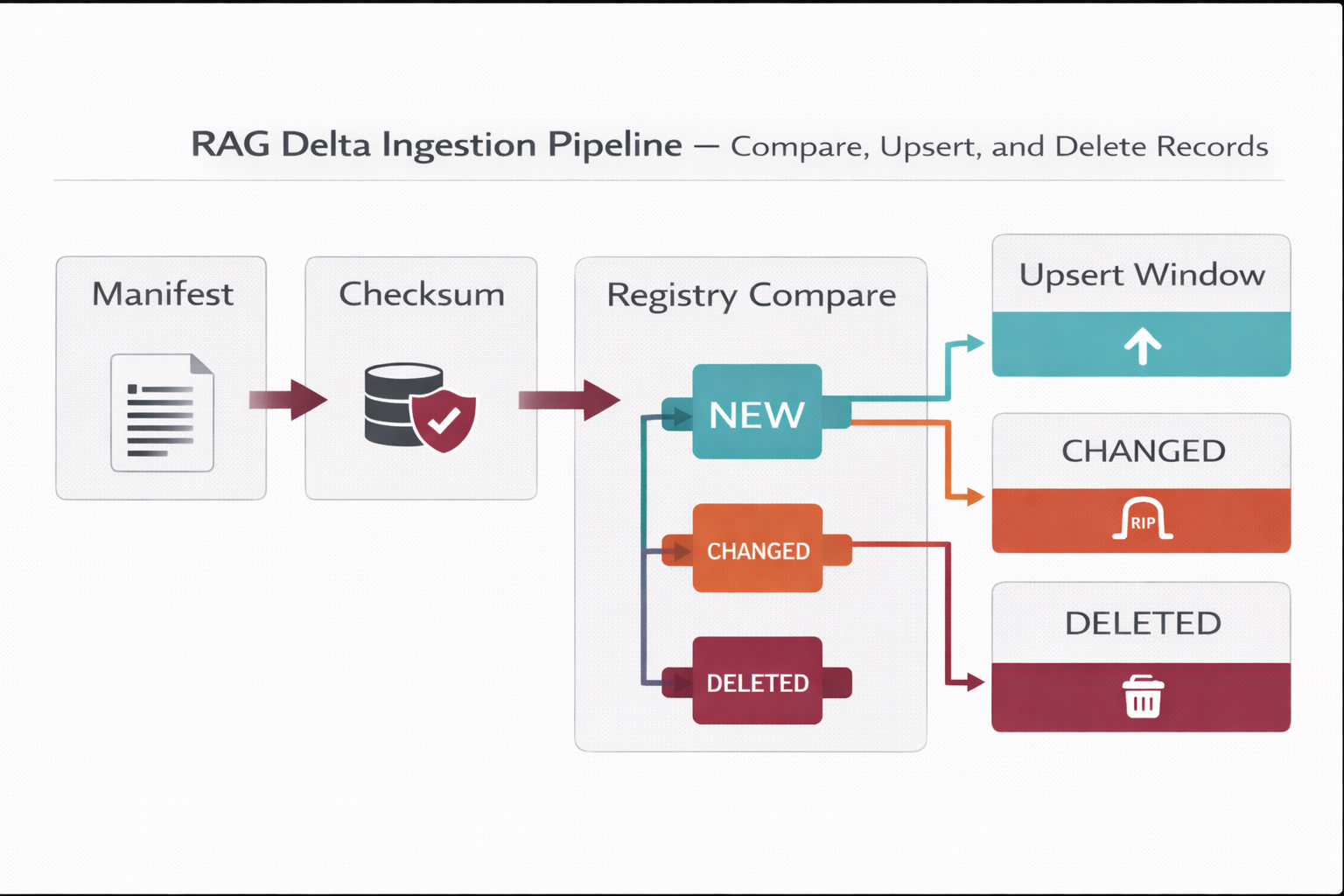
Delta ingestion and deletion pipeline diagram

Figure — Delta Ingestion + Deletion Handling

Manifest → checksum → registry compare → NEW/CHANGED/DELETED with upsert, tombstone, and scheduled hard delete.

5) Who triggers updates? Webhooks vs polling vs governance actions

Pattern How it triggers When to use
A) Webhooks (near real-time) Source emits events (created/updated/deleted) to the indexing service Best when supported; lowest lag for updates.
B) Polling (scheduled scan) Connector lists docs every X hours; compares registry (checksum) Most common in enterprise; robust when events are unavailable.
C) Human governance (exceptions) Owner changes lifecycle state/effective date; system applies indexing rules Regulated docs, sensitive policies, emergency takedowns.
Best practice
People control policy and lifecycle state (Draft/Active/Deprecated/Retired). The system controls execution (chunk, embed, upsert, tombstone, delete).

6) Governance & Operating Model (mapped control + RACI)

6.1 Governance mapping (who owns what)

Area Accountability Typical roles
Knowledge ownership Accuracy, approvals, effective dates, lifecycle state Policy Owner (Security/HR/PMO), Document Steward
Platform operations Connectors, indexing pipeline, retries, monitoring RAG Ops / MLOps / Platform Engineering
Security & risk ACL model, least privilege, audit requirements Security, GRC, IAM
Product / UX Citations UX, feedback loops, adoption Product, UX, Enablement

6.2 RACI (minimum viable)

Activity Doc Owner RAG Ops Security/GRC Product
Approve doc & set lifecycle state R/A C C I
Connector configuration (sources, scopes) C R/A C I
Delta ingestion execution (chunk/embed/upsert) I R/A C I
ACL model & enforcement C R A I
Deletion handling (tombstone + hard delete) C R/A C I
Evaluation gates & regression suite C R C A

6.3 Operating cadence (what runs automatically)

Automated (system)
  • Webhook processing or polling scan
  • Checksum compare (delta ingestion)
  • Chunk → embed → upsert
  • Tombstones on version change or deletion
  • Retries + alerts on failures
Human oversight (governance)
  • Document approvals & lifecycle state changes
  • Monthly review of top cited docs and “no-answer” gaps
  • Security review of ACLs and sensitive domains
  • Sign-off for re-chunking or embed-model migrations
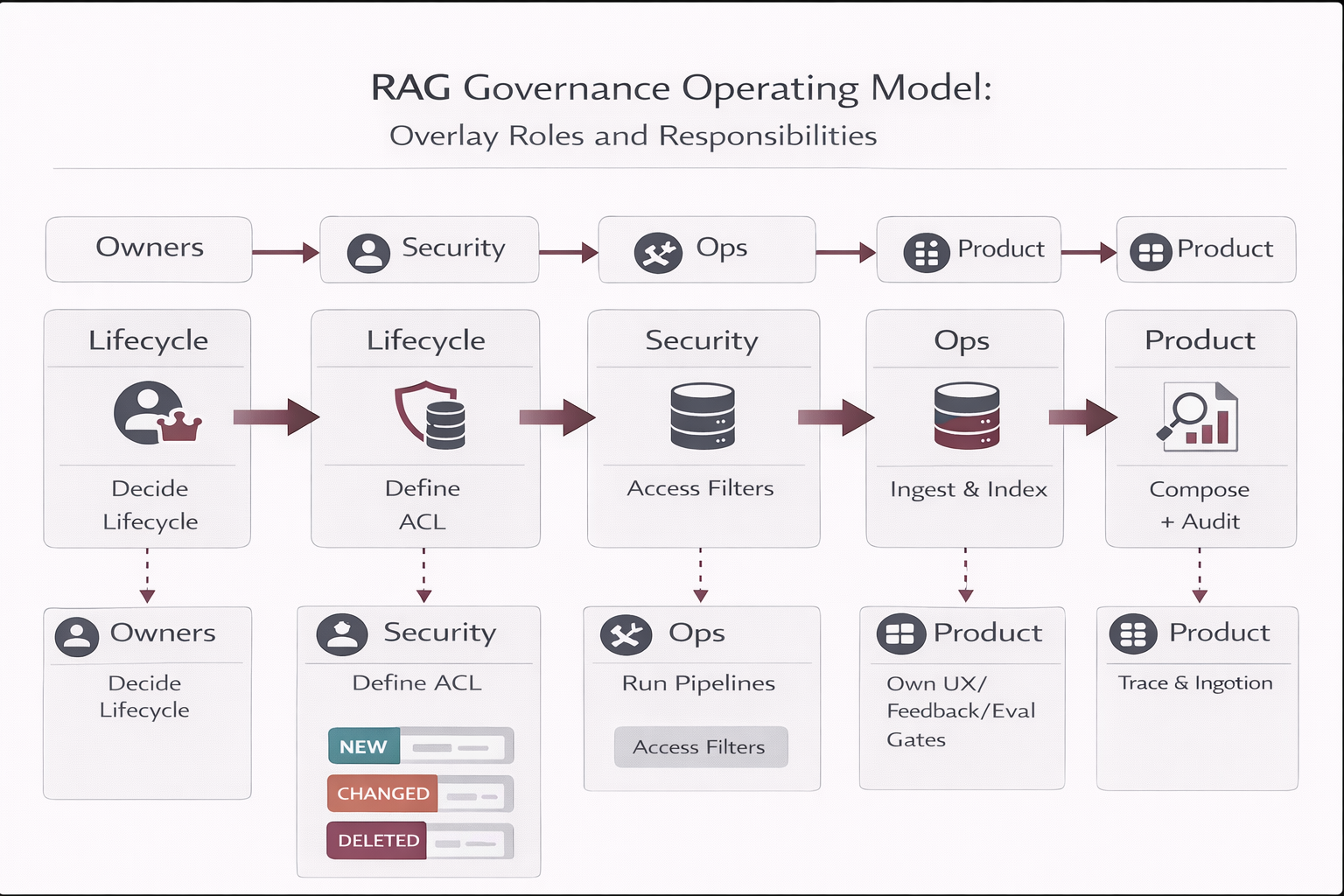
Governance operating model mapped to pipeline

Figure — Governance Operating Model Mapped to the Pipeline

Decision rights (owners/security) over lifecycle and access, plus automated execution (ops) across ingestion, indexing, retrieval, and auditing.

7) Architecture description (end-to-end control)

End-to-end system (descriptive): Sources of Record (SharePoint/Confluence/Drive/CMS) → Connector (webhook listener or polling scanner) → Normalization (clean text + structure) → Registry (checksums, lifecycle, config, state) → Chunking (profile-based, stable IDs) → Embedding model (returns vectors) → Vector DB (upsert vectors + payload; ACL metadata) → Retrieval (ACL filters + freshness + lifecycle penalties) → LLM Answer (evidence-only + citations) → Trace logs + feedback (audit + evaluation) → Ops dashboard (health, lag, cost, quality)
Suggested images to generate
rag_chunking_e2e.png rag_storage_responsibilities.png rag_delta_ingestion_deletions.png rag_governance_operating_model.png
5 — Build Phases (Prototype → Production-Ready)

Build Phases (Prototype → Production-Ready)

Build Phases (Prototype → Production-Ready)

Phase 0 — Scope & “Golden Set” (Day 1–2)

  • Select 10–50 “golden” documents (policies, SOPs, templates) with high business value.
  • Define the first 30–50 benchmark questions (real user queries) and expected sources.
  • Define “Definition of Done” for answers: citations required, abstain rules, freshness rules.

Phase 1 — Ingestion & Registry (Day 2–4)

Build a registry first. Your registry is your operational truth: what is indexed, with what configuration, and when.

Registry Field Purpose
doc_idStable identifier to track versions across updates.
checksumDetect real changes (prevents re-indexing unchanged docs).
statusDraft/Active/Deprecated/Retired controls retrieval behavior.
chunking_profileKeep chunking changes controlled; supports re-chunking on demand.
embed_modelTrack embedder for reproducibility and rollback.
last_indexed_atOps cadence and debugging.
index_stateOK / FAILED / PENDING with error_message for retries.
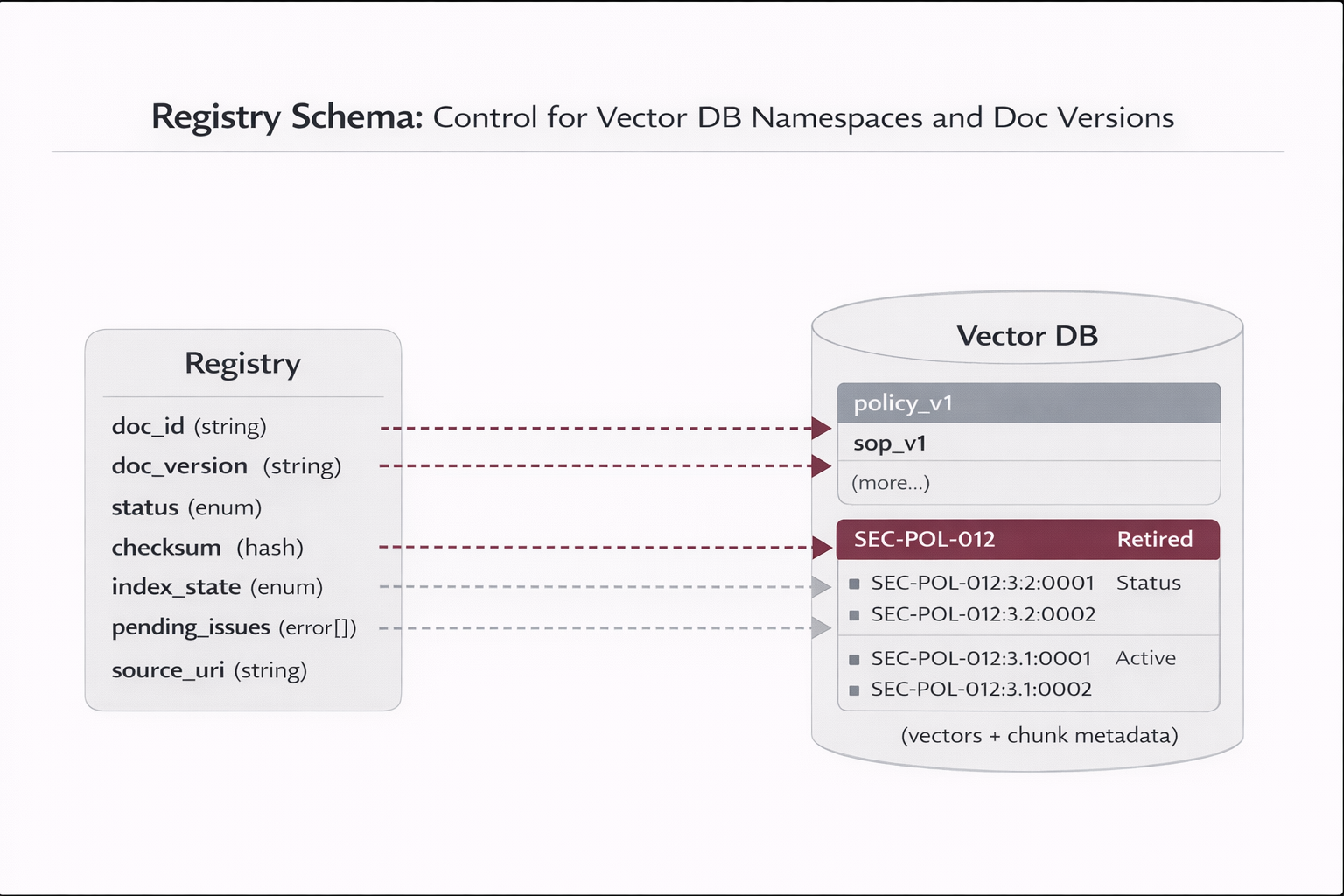
RAG registry schema diagram

Figure — RAG Document Registry

The registry is the system of record for indexing configuration and lifecycle state. It enables delta ingestion, auditability, controlled re-chunking, and rollback.

Phase 2 — Chunking (Day 4–5)

Chunking is a primary quality lever. Use “profiles” instead of ad-hoc changes.

Profile Doc Types Chunk Size Rules
policy_v1 Policies 600–900 tokens Respect headings; include definitions; overlap 10–15%.
sop_v1 SOPs / procedures 400–700 tokens Keep steps intact; preserve numbered steps; overlap ~10%.
faq_v1 FAQs 200–400 tokens Smaller chunks for precision; minimal overlap.
tech_v1 Technical docs variable Split by headings; keep code blocks intact; avoid mixing unrelated sections.
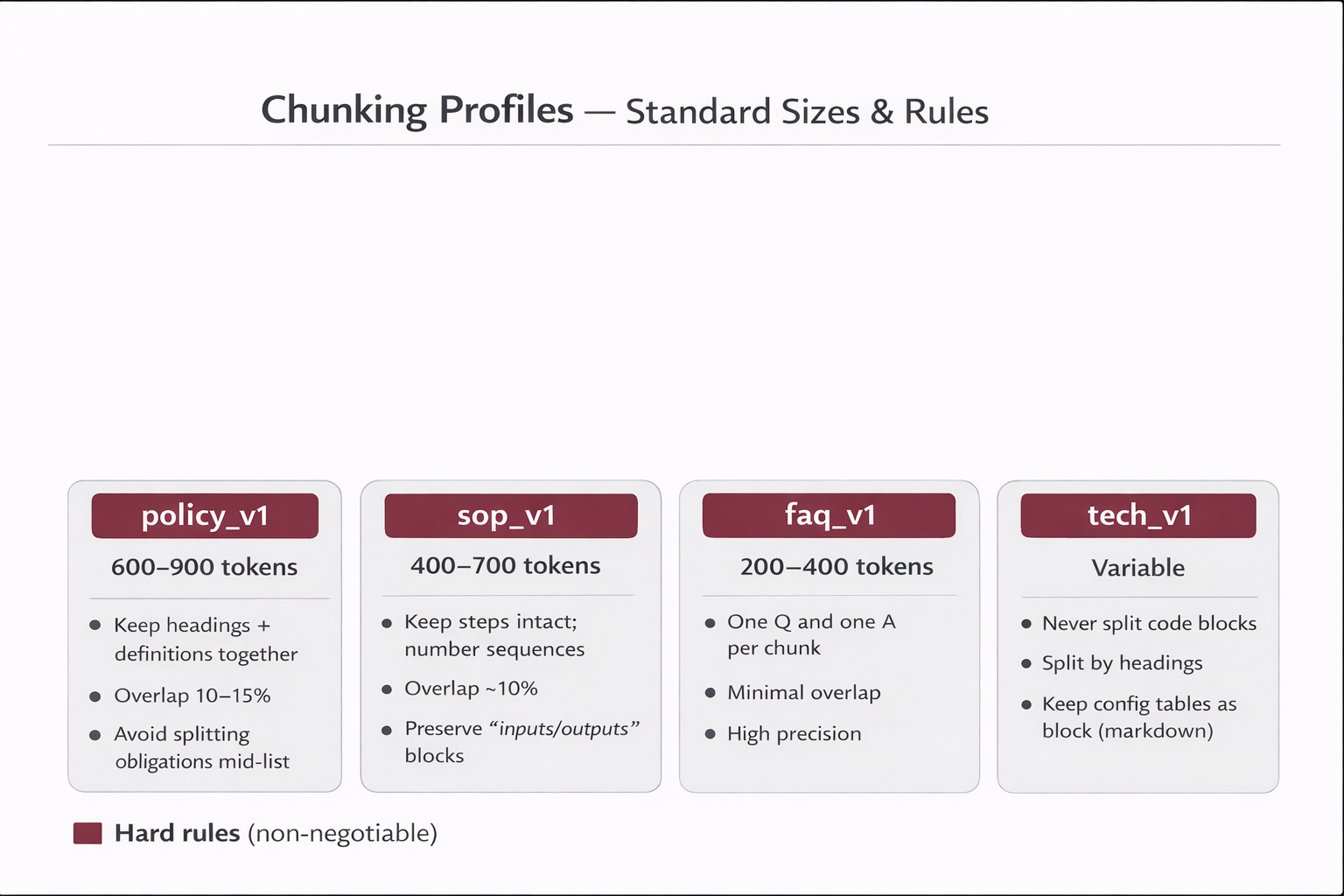
Chunking profiles diagram

Figure — Chunking Profiles & Stability

Shows how chunking profiles create controlled evolution: you do not “randomly tweak chunk sizes” in production; you version and measure changes.

Phase 3 — Embeddings & Upsert (Day 5–6)

  • Embed chunks in batches; store embed_model + embed_version in registry.
  • Upsert vectors with doc_version in IDs for rollback.
  • Apply tombstones for retired content (soft delete) before hard delete.
Recommended ID strategy: doc_id = stable (e.g., SEC-POL-012) doc_version = semantic or timestamp (e.g., 3.2 or 2025-11-02) chunk_id = doc_id + ":" + doc_version + ":" + chunk_seq Example: SEC-POL-012:3.2:0007

Phase 4 — Retrieval (Day 6–7)

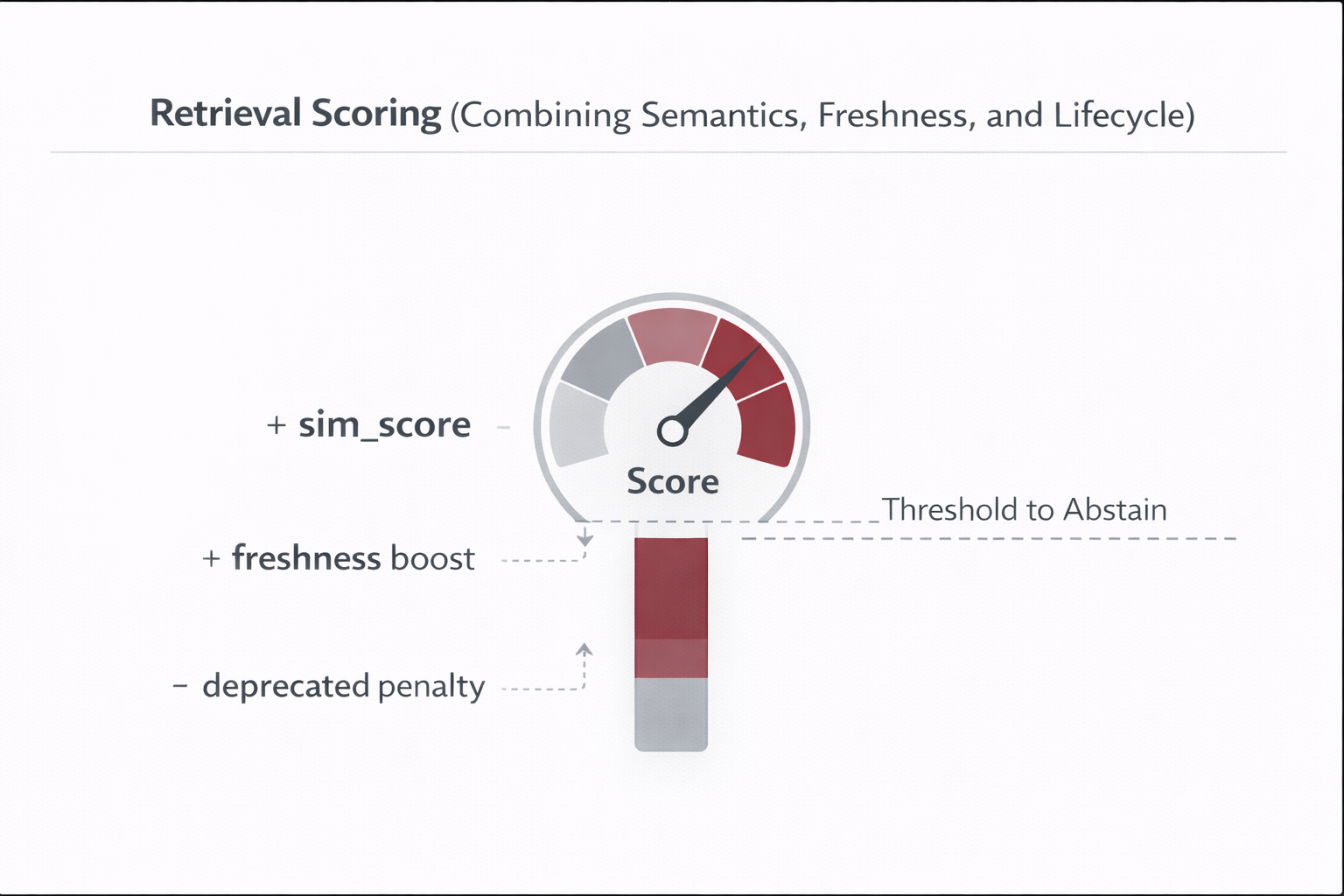
Production retrieval is not “top-k cosine similarity”. It is similarity + ACL filtering + freshness + lifecycle penalties.

Retrieval scoring pattern (conceptual): final_score = sim_score + freshness_boost(last_modified_at) + status_boost(status == "Active") - deprecated_penalty(status == "Deprecated") - staleness_penalty(effective_to in past)
Retrieval scoring diagram with freshness and lifecycle

Figure — Retrieval Ranking with Freshness & Lifecycle

A view of how semantic relevance is adjusted by operational metadata so the agent prefers current, active documents, and reduces the risk of citing outdated content.

Phase 5 — Grounded Answering (Day 7–8)

  • Use an “evidence-only” system instruction and include citations.
  • Define abstention rules: if evidence score below threshold → ask clarifying question or say “not found”.
  • Return structured citations (doc_id, section, version, source_uri) to support click-through UX.
Answer contract (example): { "answer": "...", "citations": [ {"doc_id":"SEC-POL-012","version":"3.2","section":"Access Control","source_uri":"..."}, {"doc_id":"PMO-SOP-004","version":"2.1","section":"EPIC Approval","source_uri":"..."} ], "retrieval": {"top_k":6,"min_score":0.20}, "abstained": false }
6 — From RAG to an Agent (Tool-Using, Policy-Driven)

From RAG to an Agent (Tool-Using, Policy-Driven)

From RAG to an Agent (Tool-Using, Policy-Driven)

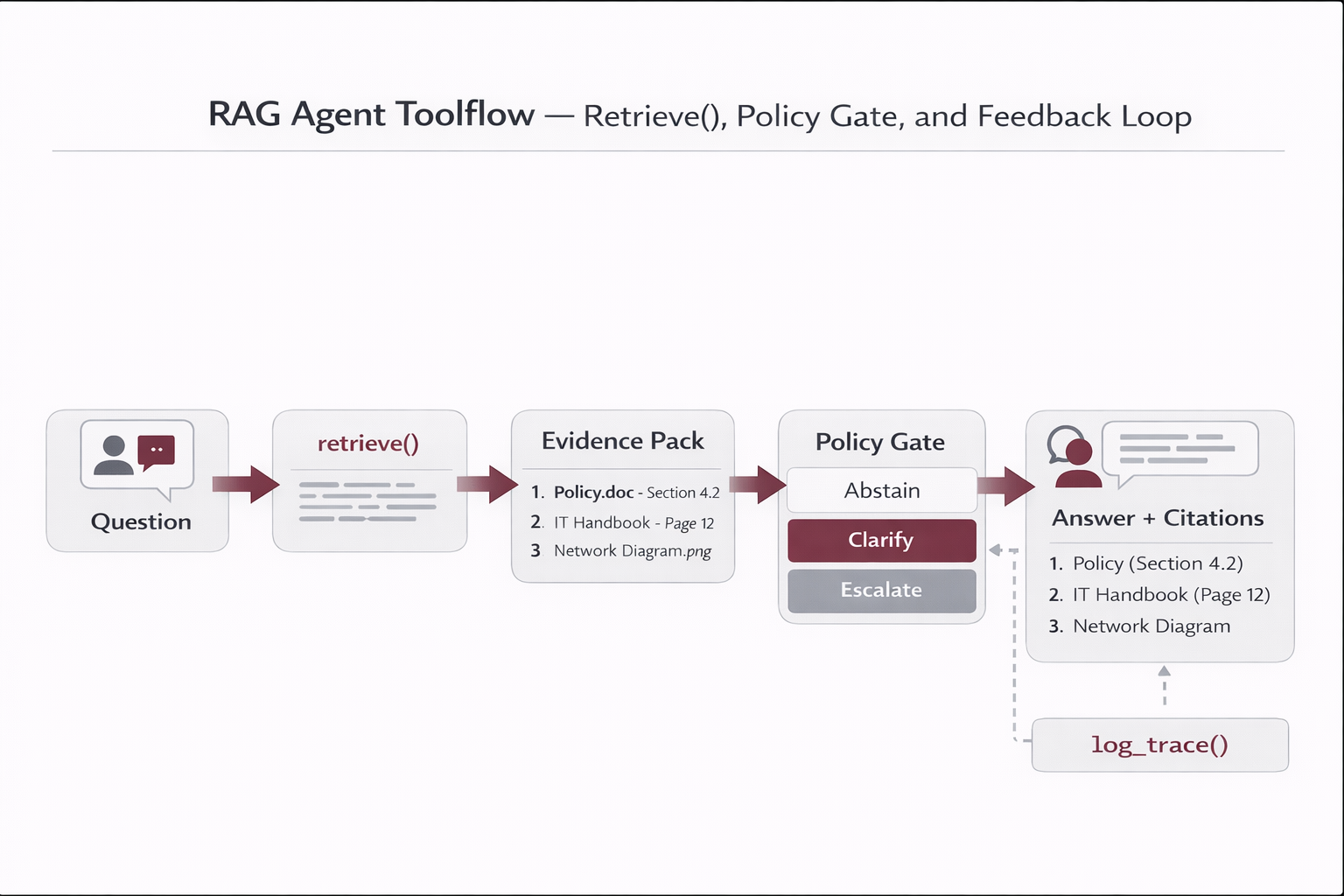
A “RAG chatbot” answers questions. A RAG agent can decide when to retrieve, when to abstain, and when to execute controlled actions (tickets, approvals, workflow triggers).

Core agent tools
  • retrieve(query, user_ctx) → returns evidence chunks + metadata
  • compose_answer(question, evidence) → grounded answer + citations
  • ask_clarifying_question() → when evidence is insufficient
  • escalate_to_human() → when policy/risk requires approval
  • log_trace() → audit: retrieved chunks, versions, scores
Non-negotiable policy
Evidence-only answers Abstain below threshold Citations required Logs required
This is the “enterprise line”: if you can’t show evidence and traceability, stakeholders won’t trust it.
RAG agent toolflow diagram

Figure — Agent Loop with Retrieval, Policy Gates, and Tools

The loop shows how retrieval is invoked before response, and how governance gates decide whether to answer, ask clarifying questions, or escalate to a human workflow.

Reference pseudo-implementation

def agent_answer(question: str, user_ctx: dict): # 1) Retrieve evidence with ACL filters results = retrieve( query=question, filters={"access_tags": user_ctx["groups"], "tenant_id": user_ctx["tenant_id"]}, top_k=6 ) # 2) Decide: abstain / clarify if not results or results[0]["score"] < 0.20: log_trace(question, user_ctx, results, abstained=True) return { "answer": "I couldn’t find sufficient evidence in the approved knowledge base. Can you specify the domain (HR/Security/PMO) or the document family?", "citations": [], "abstained": True } # 3) Compose grounded answer with citations evidence_pack = "\n\n".join([r["text"] for r in results]) response = compose_answer( question=question, evidence=evidence_pack, instruction="Answer ONLY using evidence. If missing, say so. Include citations." ) citations = [{"doc_id": r["meta"]["doc_id"], "version": r["meta"]["version"], "section": r["meta"]["section"]} for r in results[:3]] log_trace(question, user_ctx, results, abstained=False, citations=citations) return {"answer": response, "citations": citations, "abstained": False}
7 — Operations & RAG Health Framework (Enterprise)

Operations & RAG Health Framework (Enterprise)

Operations & RAG Health Framework (Enterprise)

Document lifecycle (governance)

State Meaning RAG behavior
Draft Not approved; still under review Do not index; optionally store in a “sandbox” namespace.
Active Approved and current Boost ranking; preferred citations; used for official answers.
Deprecated Superseded; kept for history Penalize ranking; allow retrieval only if explicitly requested or needed for history.
Retired Removed or invalid Tombstone (soft delete) then hard delete in maintenance windows.

Delta ingestion (healthy updates without reindex-all)

  • Connectors collect a manifest: doc_id, last_modified_at, source_uri, access_tags.
  • Compute checksum (hash) of normalized content (or per section).
  • Compare to registry. Only process: new, changed, deleted.
  • Upsert new vectors; mark old chunks tombstoned if version changes.
  • Record index_state and errors for retries.
Why checksum matters
It prevents “accidental full re-indexing,” controls cost, and keeps indexing pipelines predictable.
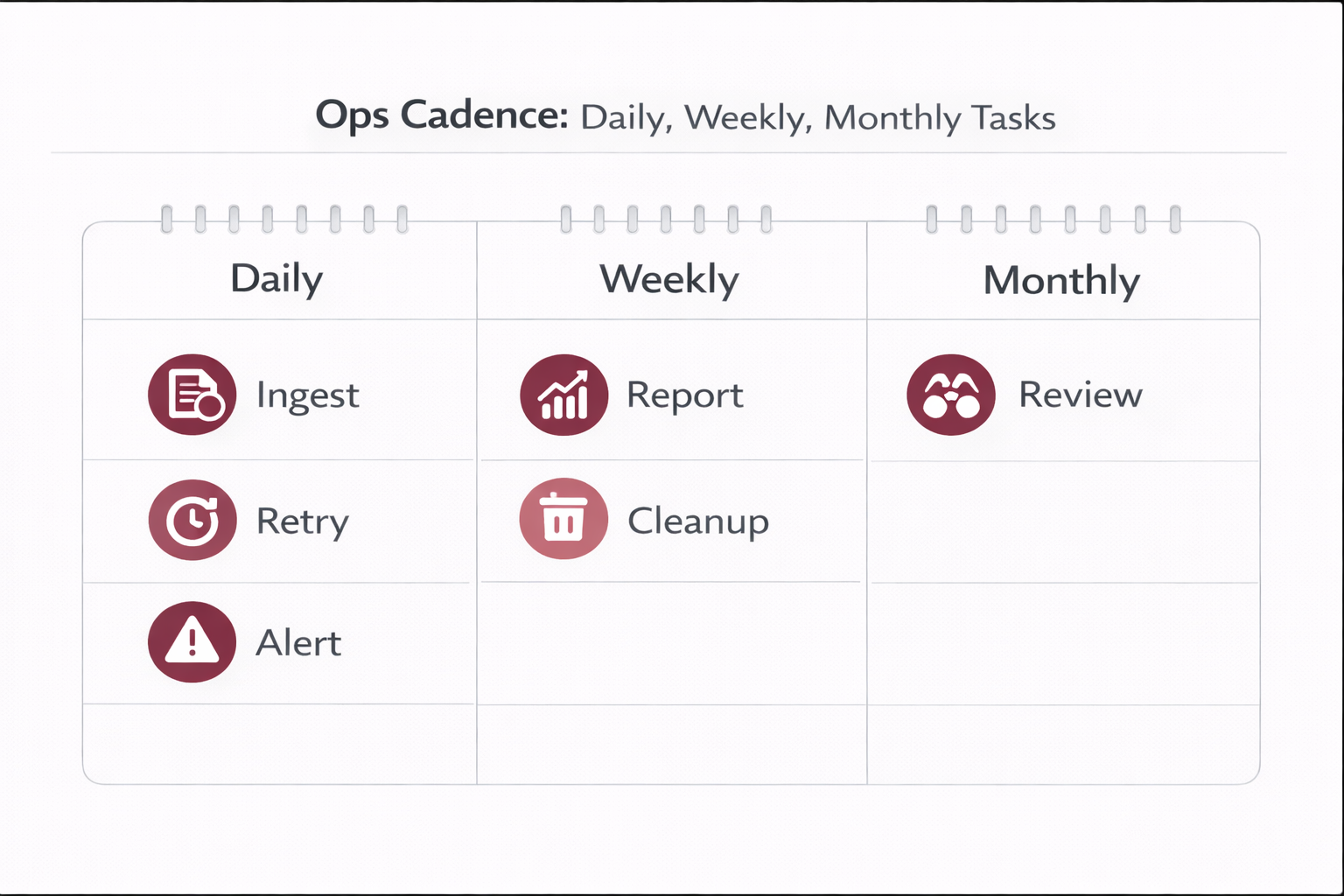
Operations cadence diagram

Figure — Daily / Weekly / Monthly RAG Ops

Daily: delta ingestion + retries + anomaly alerts. Weekly: analyze unanswered queries, duplicates, and missing owners. Monthly: retire docs, run regression evaluation, consider controlled chunking revisions.

Operational routines

Daily (automated)
  • Delta ingestion runs every X hours
  • Retry FAILED items with backoff
  • Alert if connectors return 0 docs unexpectedly
  • Alert on embedding cost spikes (budget thresholds)
Weekly / Monthly
  • Review top “abstain/no-answer” queries (missing docs?)
  • Identify most-cited docs (ensure owners + freshness)
  • Detect duplicates (same content across sources)
  • Monthly: cleanup retired chunks, run regression suite

Observability & audit (what to log)

Per request, log: - query_id, timestamp, user_id, tenant_id - retrieved_chunks: [chunk_id, doc_id, version, score, section] - filters applied (ACL groups, tenant namespace, doc_type) - prompt_version / policy_version - response_time, token usage (optional) - citations returned - abstained? clarifying question? - user feedback (👍/👎 + reason)
8 — Continuous Evaluation (RAG Never Sleeps)

Continuous Evaluation (RAG Never Sleeps)

Continuous Evaluation (RAG Never Sleeps)

Golden set (minimum viable)

Start with 30–50 real questions per domain (Security, HR, PMO, etc.). Each question should have expected “correct source documents” (doc_id + section).

Metrics (practical + operational)

Metric Definition What it tells you
Recall@K Did the correct chunk appear in top-K? Whether your retrieval is finding the right evidence.
Citation Accuracy Are citations the correct document/section? Whether answers are defensible and not misattributed.
Groundedness Is the answer supported by retrieved evidence? Whether the model is inventing or staying grounded.
Abstention Rate When unsure, does it abstain? Safety/quality behavior under uncertainty.
Freshness Bias Does it cite new active docs vs old ones? Whether lifecycle + ranking are working.

Operational gates (alerts / stop conditions)

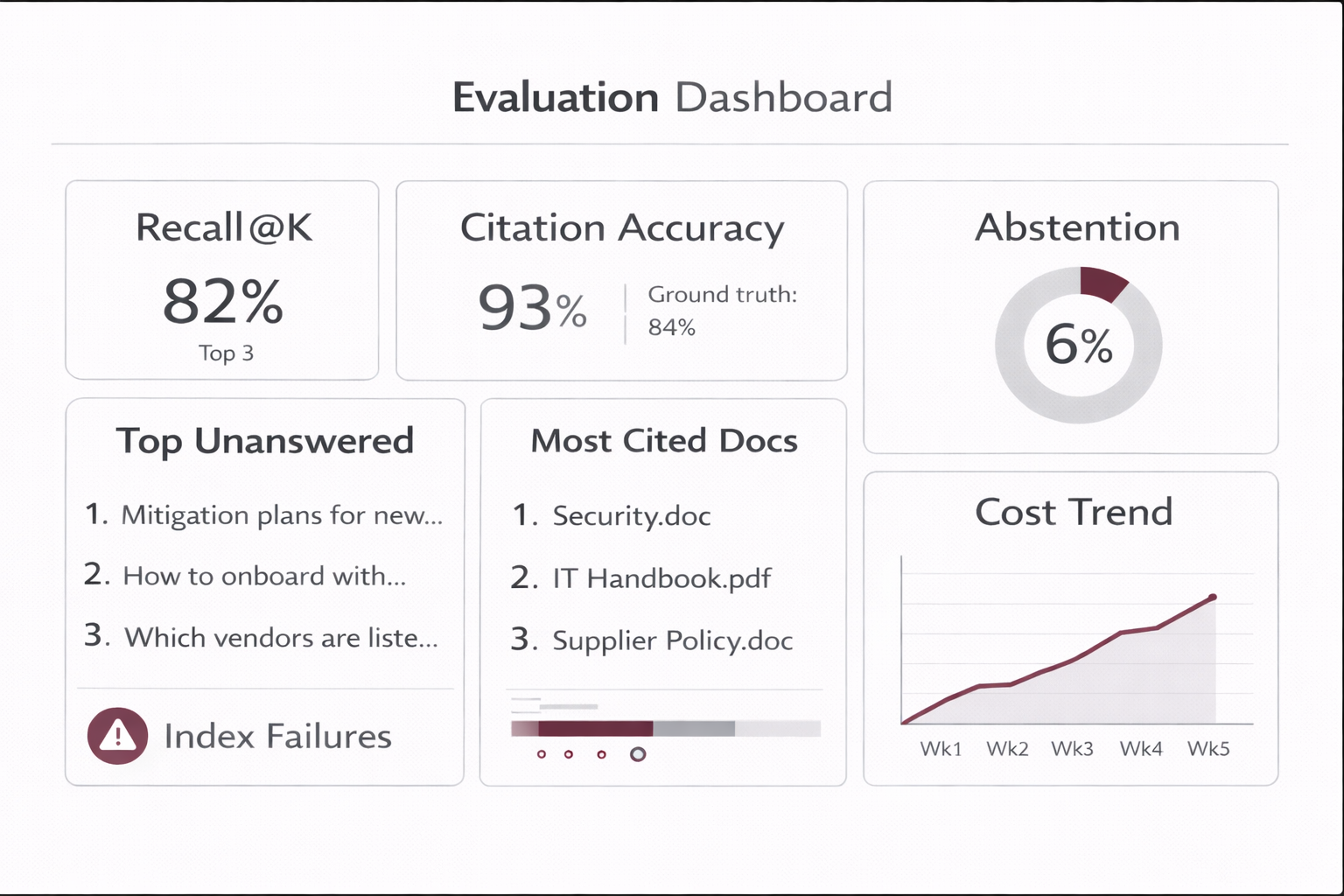
Example gates: - Citation Accuracy < 0.85 on golden set → investigate retrieval ranking / versioning - Recall@K < 0.80 → revisit chunking profiles / embed model / filters - Abstention Rate too low → raise threshold, enforce “evidence-only” - Spike in “no-answer” queries → missing docs or connector failures
RAG evaluation dashboard diagram

Figure — RAG Evaluation Dashboard

A simple “trust dashboard”: retrieval recall, citation accuracy, abstentions, top unanswered queries, most-cited docs, and indexing health signals (failures, lag, costs).

9 — Security & Access Control (Enterprise Baseline)

Security & Access Control (Enterprise Baseline)

Security & Access Control (Enterprise Baseline)

Principle: retrieval must enforce least privilege

If a user cannot access a document in the source system, the agent must not retrieve its chunks. ACL enforcement happens at retrieval time via metadata filters.

ACL strategies
  • Role-based tags: access_tags like ["Security","IT"]
  • Tenant isolation: namespace/collection per tenant
  • Document-level ACL: doc_id mapped to groups/users
  • Policy gates: require escalation for sensitive topics
Minimum controls
ACL filters Audit logs Prompt injection defenses Source allowlist
Add “prompt injection” mitigation by ignoring instructions inside retrieved docs that attempt to alter system behavior.
Security and ACL enforcement diagram

Figure — ACL Enforcement at Retrieval

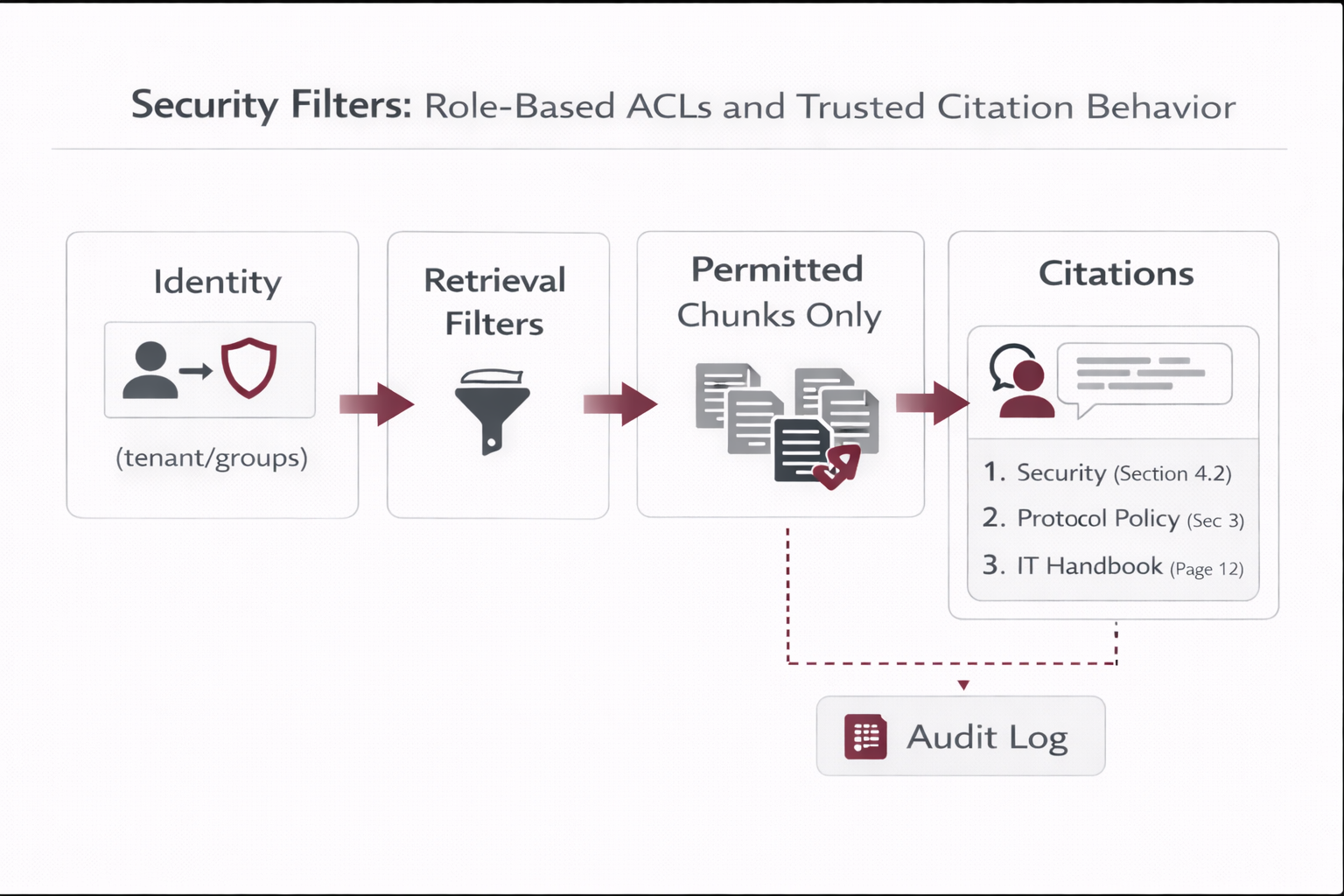
Shows how identity (tenant/group membership) becomes retrieval filters, preventing cross-team or cross-tenant leakage, while preserving audit trails for compliance.

Abuse-resistant behaviors

  • Abstain by default when no evidence is found.
  • Refuse if the user requests restricted content outside their scope.
  • Never execute writes without confirmation and explicit authorization.
  • Log suspicious prompts (exfiltration attempts, injection patterns).
10 — Security & Access Control (Enterprise Baseline)

Security & Access Control (Enterprise Baseline)

Security & Access Control (Enterprise Baseline)

Principle: retrieval must enforce least privilege

If a user cannot access a document in the source system, the agent must not retrieve its chunks. ACL enforcement happens at retrieval time via metadata filters.

ACL strategies
  • Role-based tags: access_tags like ["Security","IT"]
  • Tenant isolation: namespace/collection per tenant
  • Document-level ACL: doc_id mapped to groups/users
  • Policy gates: require escalation for sensitive topics
Minimum controls
ACL filters Audit logs Prompt injection defenses Source allowlist
Add “prompt injection” mitigation by ignoring instructions inside retrieved docs that attempt to alter system behavior.
Security and ACL enforcement diagram

Figure — ACL Enforcement at Retrieval

Shows how identity (tenant/group membership) becomes retrieval filters, preventing cross-team or cross-tenant leakage, while preserving audit trails for compliance.

Abuse-resistant behaviors

  • Abstain by default when no evidence is found.
  • Refuse if the user requests restricted content outside their scope.
  • Never execute writes without confirmation and explicit authorization.
  • Log suspicious prompts (exfiltration attempts, injection patterns).

Rate this article

Share your feedback

Optional: send a comment about this article.