Cognitive Creations Strategy · Governance · PMO · Agentic AI

Generative AI Skills — Vibe Coding in Practice with Cursor

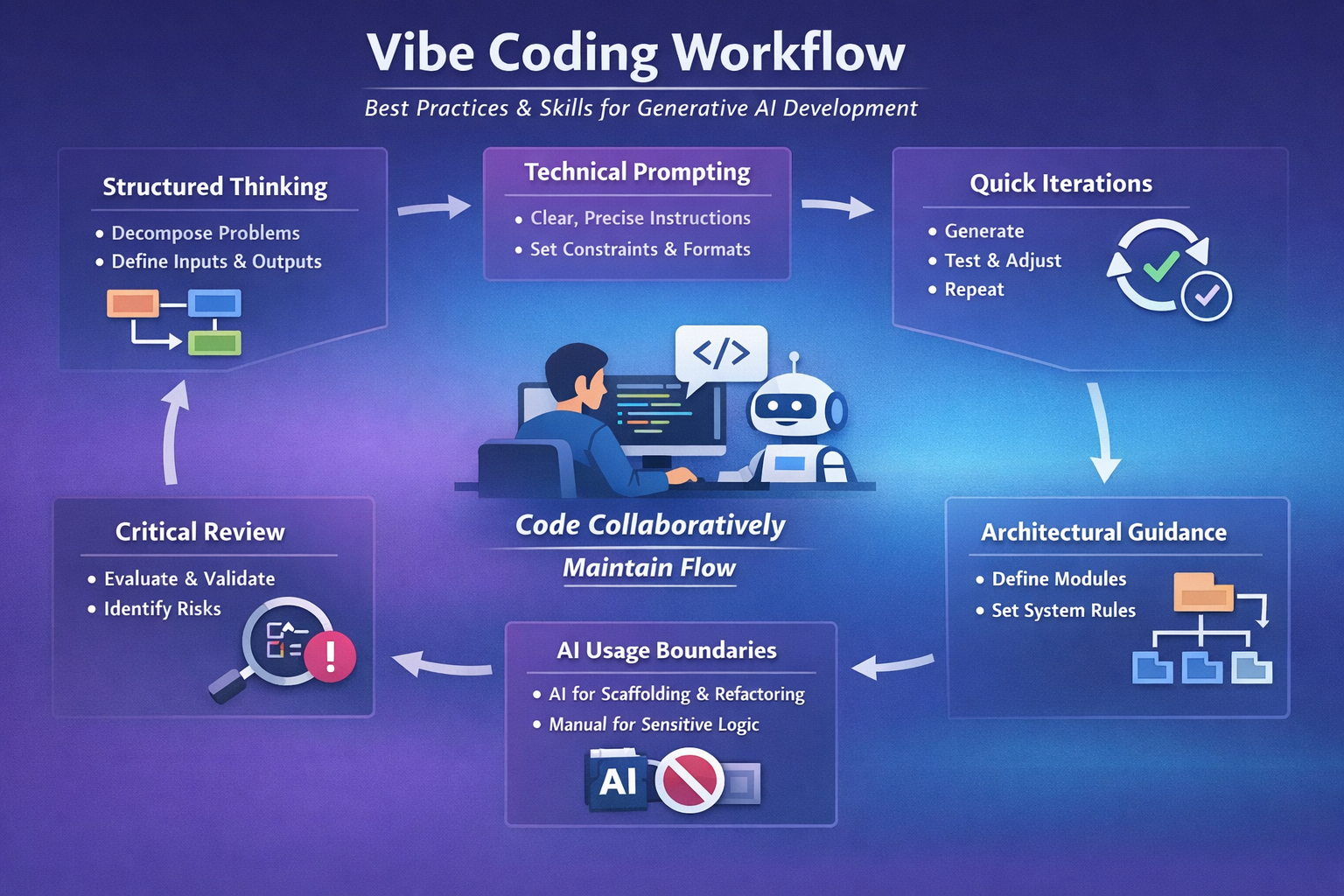
Vibe Coding Workflow — What this represents

Download as PDF

1 — 1. Introduction

1. Introduction

1. Introduction

Modern software development with Generative AI is no longer about experimenting with tools. It is about operating in flow with an AI copilot. One of the most effective emerging practices for this is vibe coding: a way of coding where intent, structure, and judgment lead, while the AI removes friction.

In tools like Cursor, these skills are not abstract. They are explicit, written, and reusable, often expressed as Markdown files (MD) that guide how the AI collaborates with you.

This article explains: what these skills are, how they translate into MD artifacts, and concrete examples you can use immediately in Cursor.

One sentence to remember
In Cursor, skills are not mental models. They are executable documents.
2 — 2. What "skills as MD" really means in Cursor

2. What "skills as MD" really means in Cursor

2. What "skills as MD" really means in Cursor

In Cursor, Markdown files act as behavioral contracts between you and the AI. They define:

  • how the AI should think,
  • how it should respond,
  • what it should and should not do,
  • and how work should flow.

In practice:

  • A skill is not assumed.
  • A skill is written.

Each MD file encodes a reusable way of working.

3 — 3. Core skill categories for Vibe Coding (1/2)

3. Core skill categories for Vibe Coding (1/2)

3. Core skill categories for Vibe Coding (1/2)

2.1 Role definition skill

The first skill is defining who the AI is in your project.

Example: ai_role.md

# AI Role – Senior Software Engineer

You act as a senior software engineer.

Principles:
- Prefer simple and readable solutions
- Avoid overengineering
- Explain tradeoffs briefly
- Assume production-grade quality

Constraints:
- Do not introduce external libraries unless explicitly requested
- Keep functions small and testable

Skill encoded: Clear technical authority and professional judgment.

2.2 Vibe coding flow skill

This MD defines how you and the AI collaborate in flow.

Example: vibe_coding.md

# Vibe Coding Guidelines

We work in small, fast iterations.

Rules:
- Generate partial solutions, not full systems
- Ask clarifying questions when context is missing
- Optimize for clarity and momentum
- Prefer refactoring over rewriting

Tone:
- Concise
- Pragmatic
- Action-oriented

Skill encoded: Maintaining flow and reducing cognitive friction.

2.3 Architectural thinking skill

Here you teach the AI how you design systems.

Example: architecture_rules.md

# Architecture Rules

Core principles:
- Separate deterministic logic from AI logic
- Business rules must be explicit and traceable
- AI is used for interpretation, analysis, or generation only

Structure:
- /core → deterministic logic
- /ai → prompts and orchestration
- /ui → presentation and rendering

Skill encoded: Architecture-first thinking with AI as a bounded component.

4 — 4. Core skill categories for Vibe Coding (2/2)

4. Core skill categories for Vibe Coding (2/2)

4. Core skill categories for Vibe Coding (2/2)

2.4 Technical prompting skill

This is where prompting becomes engineering.

Example: prompting_style.md

# Prompting Style

For code generation:
- Always specify language and version
- Define input and output formats
- State constraints explicitly

For data analysis:
- Summarize observations first
- List inconsistencies second
- Propose actions last

Avoid generic explanations.

Skill encoded: Consistent, high-signal prompt engineering.

2.5 Validation and critical thinking skill

This MD enforces human oversight.

Example: validation_rules.md

# Validation and Review Rules

- Never assume AI output is correct
- Highlight assumptions and risks
- Prefer explicit error handling
- Flag unclear logic immediately

If uncertainty exists, ask before proceeding.

Skill encoded: Critical thinking and accountability.

2.6 AI usage boundary skill

A maturity skill that prevents misuse.

Example: ai_usage_boundaries.md

# AI Usage Boundaries

Use AI for:
- Scaffolding and boilerplate
- Refactoring
- Documentation
- Summarization

Avoid AI for:
- Core financial logic
- Security-sensitive code
- Critical calculations

Skill encoded: Judgment on when AI adds value and when it introduces risk.

5 — 5. How Cursor actually uses these MD files

5. How Cursor actually uses these MD files

5. How Cursor actually uses these MD files

Cursor:

  • reads the open file,
  • considers nearby and related files,
  • preserves semantic context across edits.

When these MD files live in your repository and are referenced during work:

  • outputs become more consistent,
  • tone stabilizes,
  • architectural alignment improves.
Behavior programming
This is behavior programming, not just code generation.
6 — 5. How Cursor actually uses these MD files

5. How Cursor actually uses these MD files

5. How Cursor actually uses these MD files

Cursor:

  • reads the open file,
  • considers nearby and related files,
  • preserves semantic context across edits.

When these MD files live in your repository and are referenced during work:

  • outputs become more consistent,
  • tone stabilizes,
  • architectural alignment improves.
Behavior programming
This is behavior programming, not just code generation.

Rate this article

Share your feedback

Optional: send a comment about this article.