Cognitive Creations Strategy · Governance · PMO · Agentic AI

AI Agent Design Patterns — Guide

Hero — What this banner represents

Download as PDF

1 — AI Agents: Two Reference Families + 5 Practical Architectures

AI Agents: Two Reference Families + 5 Practical Architectures

AI Agents: Two Reference Families + 5 Practical Architectures

AI agents are rapidly moving from experimental demos to core operational components inside modern organizations. As this shift accelerates, one of the biggest challenges is not the model itself, but conceptual confusion: what exactly is an “AI agent,” how autonomous should it be, and how should it be designed in practice?

Purpose of this guide
This page provides a shared vocabulary and a set of deployable reference designs. We start with the two most common reference families used in industry to talk about agents, then translate them into five practical architectures you can teach, evaluate, and implement safely.

Why two reference families exist

The term “AI agent” is used in two complementary ways. Mature teams keep both views because they answer different questions:

Family A — Classic Agent Taxonomy (Theory)
Classifies agents by how they decide (reactive rules, internal state, goal reasoning, utility optimization, learning). It is stable, technology-agnostic, and useful for discussing capability levels and autonomy.
Family B — Modern LLM Agent Patterns (Implementation)
Focuses on how agents are built in real products using LLMs: tool use, planning, reflection, and multi-agent coordination—plus guardrails, observability, and governance.

How to use this in a session

  • Use Family A to set expectations about autonomy (what “level” of agent you actually need).
  • Use Family B to teach implementation building blocks (how you achieve reliability, safety, and scalability).
  • Then select from the five practical architectures based on task characteristics (single-step vs multi-step, policy grounding, high-stakes quality, parallel expertise).
  • Emphasize that real-world systems are usually hybrids: for example, a Planner–Executor agent may also use RAG for grounding and a bounded reflection loop for quality.
Key takeaway
Classic AI theory helps you define what kind of agent you are building (capability and autonomy). Modern LLM patterns help you implement that agent as a reliable, governable system. The strongest teams use both perspectives to avoid “prompt-only” solutions and build agents people can trust.

References (Industry + Research)

Source Type Why it’s relevant
IBM — “What are AI agents?”
https://www.ibm.com/topics/ai-agents
Documentation / Explainer Practical enterprise framing of AI agents, autonomy, and where agents fit in real business workflows.
Russell & NorvigArtificial Intelligence: A Modern Approach
Classic AI textbook reference
Foundational theory Widely used reference for classical agent taxonomies (reflex, model-based, goal-based, utility-based, learning).
ReAct (Reason + Act)
Paper / pattern commonly cited in industry
Research anchor A key basis for tool-using agent behavior: interleaving reasoning and actions with external tools.
Reflexion (Reflection loops)
Paper / pattern commonly cited in industry
Research anchor Formalizes critique-and-revise loops to improve reliability and reduce errors through bounded iteration.
AWS — Agentic AI design patterns (video sessions)
Training / conference videos
Industry video Clear coverage of tool use, planning, reflection, and multi-agent collaboration patterns, with architecture-level explanations.

Fast selection guide

If your task is... Choose Why
Single-step action with tools 1) Reactive + Tools Lowest overhead; fast throughput; deterministic validation is easy.
Policy/procedure heavy or “must be grounded” 2) RAG + Tools Reduces hallucinations; makes answers defensible via sources.
Multi-step work with dependencies 3) Planner–Executor Creates traceable plans, checkpoints, and controlled execution.
High-stakes output quality 4) Reflection Loop Improves reliability via critique + revision gates.
Complex work needing multiple skills 5) Supervisor + Specialists Parallelism + modularity; better separation of concerns.
2 — AI Agents: Two Reference Families + 5 Practical Architectures

AI Agents: Two Reference Families + 5 Practical Architectures

AI Agents: Two Reference Families + 5 Practical Architectures

AI agents are rapidly moving from experimental demos to core operational components inside modern organizations. As this shift accelerates, one of the biggest challenges is not the model itself, but conceptual confusion: what exactly is an “AI agent,” how autonomous should it be, and how should it be designed in practice?

Purpose of this guide
This page provides a shared vocabulary and a set of deployable reference designs. We start with the two most common reference families used in industry to talk about agents, then translate them into five practical architectures you can teach, evaluate, and implement safely.

Why two reference families exist

The term “AI agent” is used in two complementary ways. Mature teams keep both views because they answer different questions:

Family A — Classic Agent Taxonomy (Theory)
Classifies agents by how they decide (reactive rules, internal state, goal reasoning, utility optimization, learning). It is stable, technology-agnostic, and useful for discussing capability levels and autonomy.
Family B — Modern LLM Agent Patterns (Implementation)
Focuses on how agents are built in real products using LLMs: tool use, planning, reflection, and multi-agent coordination—plus guardrails, observability, and governance.

How to use this in a session

  • Use Family A to set expectations about autonomy (what “level” of agent you actually need).
  • Use Family B to teach implementation building blocks (how you achieve reliability, safety, and scalability).
  • Then select from the five practical architectures based on task characteristics (single-step vs multi-step, policy grounding, high-stakes quality, parallel expertise).
  • Emphasize that real-world systems are usually hybrids: for example, a Planner–Executor agent may also use RAG for grounding and a bounded reflection loop for quality.
Key takeaway
Classic AI theory helps you define what kind of agent you are building (capability and autonomy). Modern LLM patterns help you implement that agent as a reliable, governable system. The strongest teams use both perspectives to avoid “prompt-only” solutions and build agents people can trust.

References (Industry + Research)

Source Type Why it’s relevant
IBM — “What are AI agents?”
https://www.ibm.com/topics/ai-agents
Documentation / Explainer Practical enterprise framing of AI agents, autonomy, and where agents fit in real business workflows.
Russell & NorvigArtificial Intelligence: A Modern Approach
Classic AI textbook reference
Foundational theory Widely used reference for classical agent taxonomies (reflex, model-based, goal-based, utility-based, learning).
ReAct (Reason + Act)
Paper / pattern commonly cited in industry
Research anchor A key basis for tool-using agent behavior: interleaving reasoning and actions with external tools.
Reflexion (Reflection loops)
Paper / pattern commonly cited in industry
Research anchor Formalizes critique-and-revise loops to improve reliability and reduce errors through bounded iteration.
AWS — Agentic AI design patterns (video sessions)
Training / conference videos
Industry video Clear coverage of tool use, planning, reflection, and multi-agent collaboration patterns, with architecture-level explanations.

Fast selection guide

If your task is... Choose Why
Single-step action with tools 1) Reactive + Tools Lowest overhead; fast throughput; deterministic validation is easy.
Policy/procedure heavy or “must be grounded” 2) RAG + Tools Reduces hallucinations; makes answers defensible via sources.
Multi-step work with dependencies 3) Planner–Executor Creates traceable plans, checkpoints, and controlled execution.
High-stakes output quality 4) Reflection Loop Improves reliability via critique + revision gates.
Complex work needing multiple skills 5) Supervisor + Specialists Parallelism + modularity; better separation of concerns.
3 — Theoretical foundations: Two reference families used in industry

Theoretical foundations: Two reference families used in industry

Theoretical foundations: Two reference families used in industry

The term “AI agent” is used in two ways. To reduce confusion in your session, it helps to anchor on (A) a classic taxonomy that classifies agents by their decision logic, and (B) modern implementation patterns that show how LLM-based agents are built today.

Family A — Classic agent taxonomy (AI theory)

This family is the most common “textbook” way to describe agents. It classifies agents by how they decide (reactive rules, internal state, goal reasoning, utility optimization, learning).

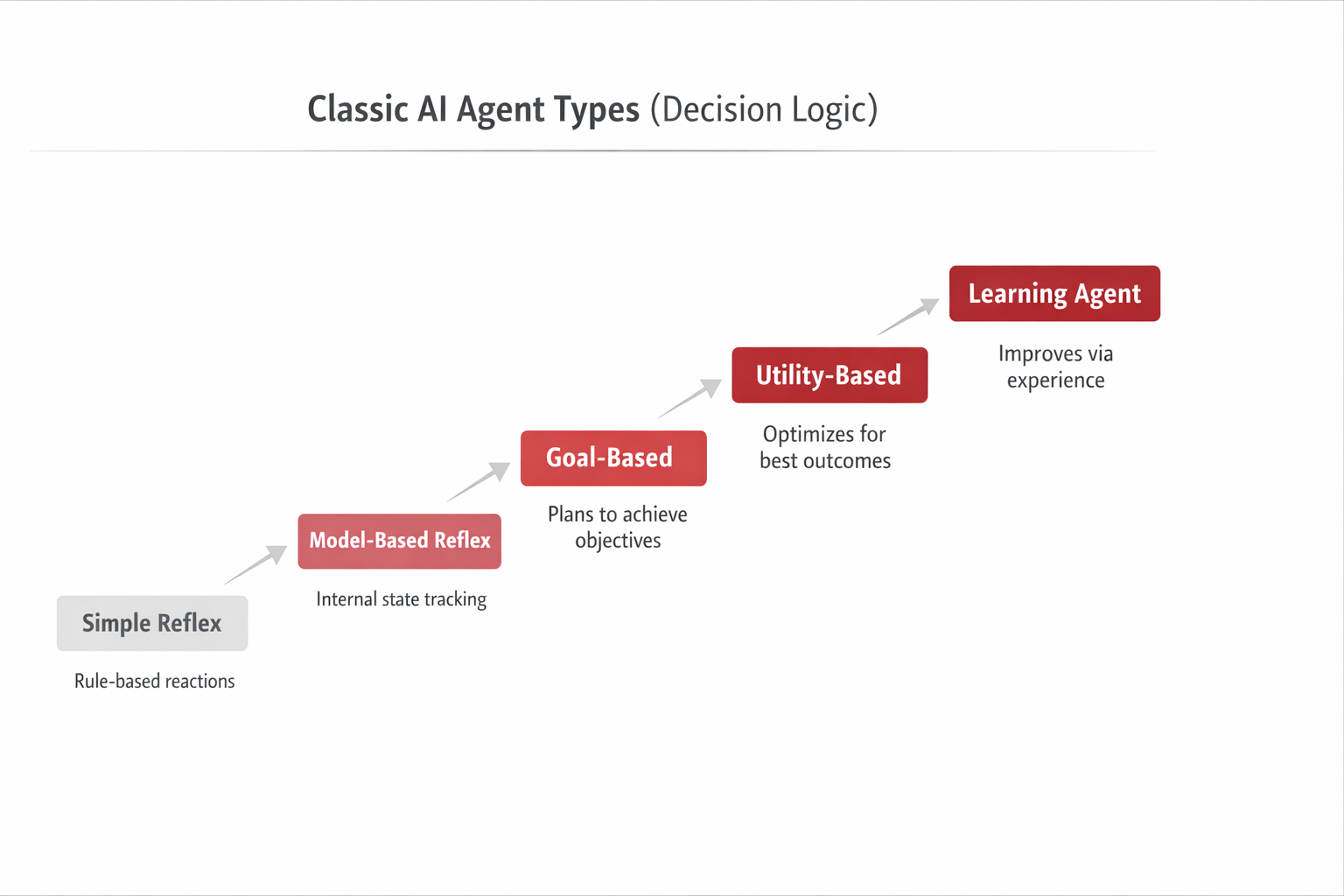
Theory Family A: Classic agent taxonomy diagram

Figure — Classic Agent Types (Decision Logic)

This visual is a capability ladder (not a product architecture). It explains how agents evolve from purely reactive rules to learning from experience. Use it to set expectations: as you move right, you typically gain adaptability—but also add complexity, data needs, and stronger governance requirements.

Main authors / popularizers
Stuart Russell and Peter Norvig popularized this taxonomy in the widely used textbook Artificial Intelligence: A Modern Approach (AIMA).
Why it matters
Provides a stable vocabulary for “agent capability.” It is technology-agnostic (works for robotics, software agents, and beyond).

Quick mapping to modern LLM systems

Classic type Modern implementation intuition
Simple reflex Reactive tool chains with rules + validations (fast, low memory).
Model-based reflex Reactive + state tracking (memory/state store), still mostly reactive.
Goal-based Planner–Executor or “plan-then-execute” with checkpoints.
Utility-based Planning with explicit trade-offs (cost/time/risk scoring).
Learning agent Reflection loops + feedback + evaluation; sometimes online learning or reinforcement learning in specialized settings.

Family B — Modern LLM agent patterns (implementation)

This family is the “how to build it” viewpoint used heavily in industry since 2022. It focuses on patterns that make LLMs behave more like systems: tool use, planning, reflection, and multi-agent coordination.

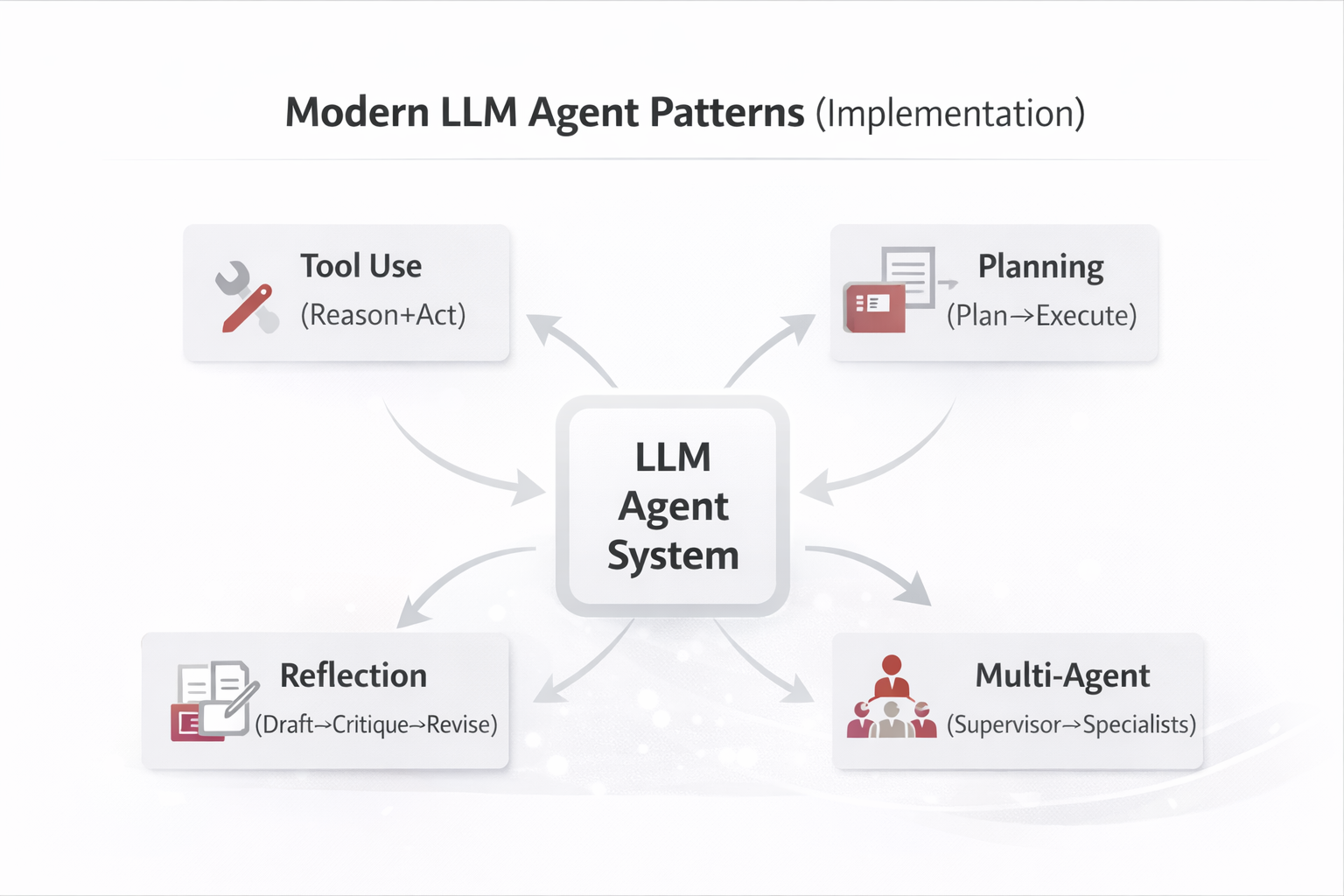
Theory Family B: Modern LLM agent patterns diagram

Figure — LLM Agent Patterns (Implementation)

This figure summarizes the four most common building blocks used to implement LLM-based agents in industry. Each block is a reusable capability (tools, planning, reflection, coordination) that can be combined. The center node represents the overall agent runtime (prompts, tool router, memory/state, logging, and guardrails) that hosts these patterns.

Key research anchors (commonly cited)
ReAct (Reason + Act via tools), Plan-and-Solve (planning before execution), and Reflexion (reflection loops for self-improvement). Multi-agent orchestration is also widely used in practice.
Industry popularizers
Major cloud and platform teams (e.g., AWS, OpenAI ecosystem, and agent frameworks) frequently teach these patterns as reusable building blocks.

Why these two families coexist

  • Family A gives language for “agent intelligence level” (decision logic).
  • Family B gives patterns for “agent system architecture” (how to implement with LLMs and tools).
  • In modern products, we often implement Family A concepts using Family B patterns.

Note: In the next sections, we translate these foundations into five deployable architectures.

4 — Building an AI Agent as a Product: From Idea to Production

Building an AI Agent as a Product: From Idea to Production

Building an AI Agent as a Product: From Idea to Production

Designing an AI agent should be approached as a product development effort, not as a prompt-engineering exercise. Mature organizations treat agents as software products with clear users, workflows, controls, UX, and lifecycle management. Below is a detailed, industry-strong process using a real example: an Excel Reconciliation Agent.

Agent type & recommended patterns for this example
Treat the Excel Reconciliation Agent as a goal-directed operational agent (classic taxonomy: goal-based / utility-aware). Architecturally, it is best implemented as a Planner–Executor with Tool Use (parsing, matching, exporting), plus a bounded Reflection loop for quality gates. Optionally add RAG if you must ground decisions in policy/SOP (e.g., accounting rules).
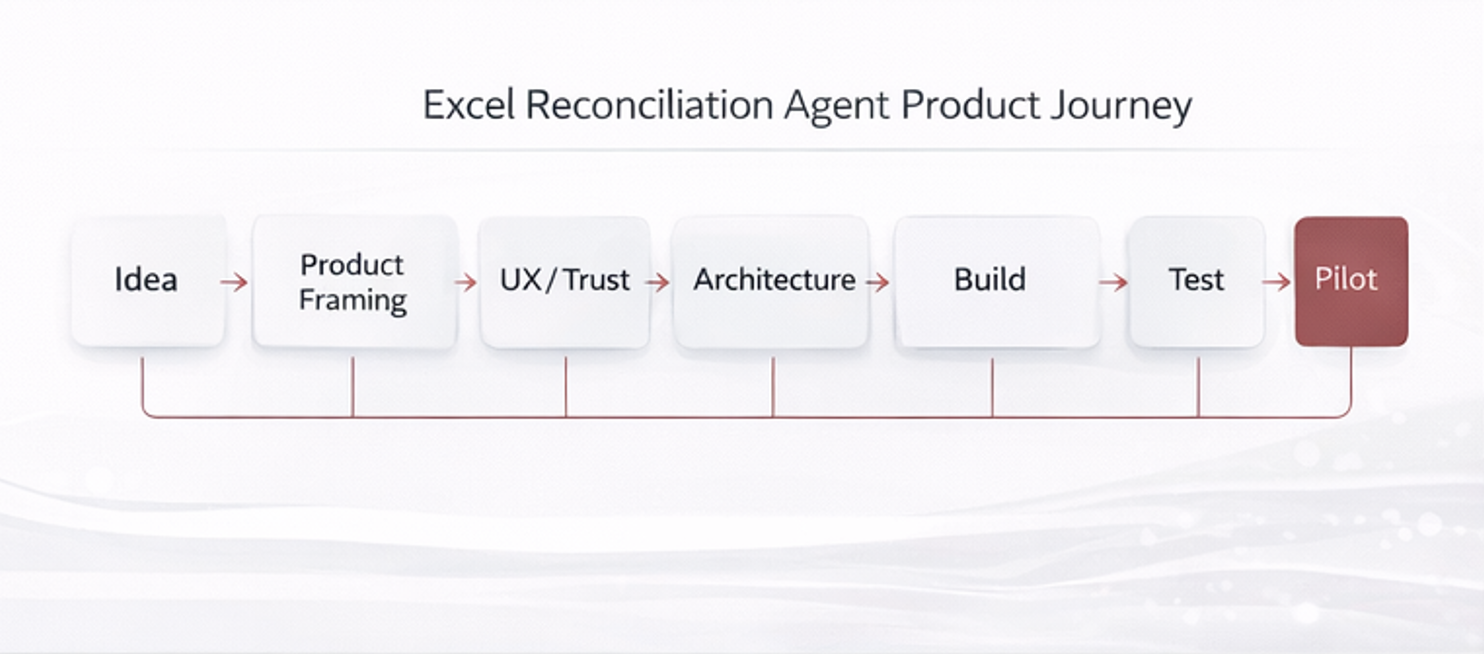
Product journey overview for building an AI agent

Figure — End-to-end agent product lifecycle

This visual is a high-level map of the product journey: discovery → UX/prototype → architecture → build → evaluation → pilot → deployment → continuous improvement. It frames the agent as a long-lived product with controls, telemetry, and iteration—not a one-off automation.

1) Product Framing & Problem Definition

Start by framing the agent as a product with a clear value proposition. For Excel reconciliation, the problem is not “compare files”—it is: reduce manual reconciliation time, errors, and cognitive load for finance or operations teams.

Who / Why
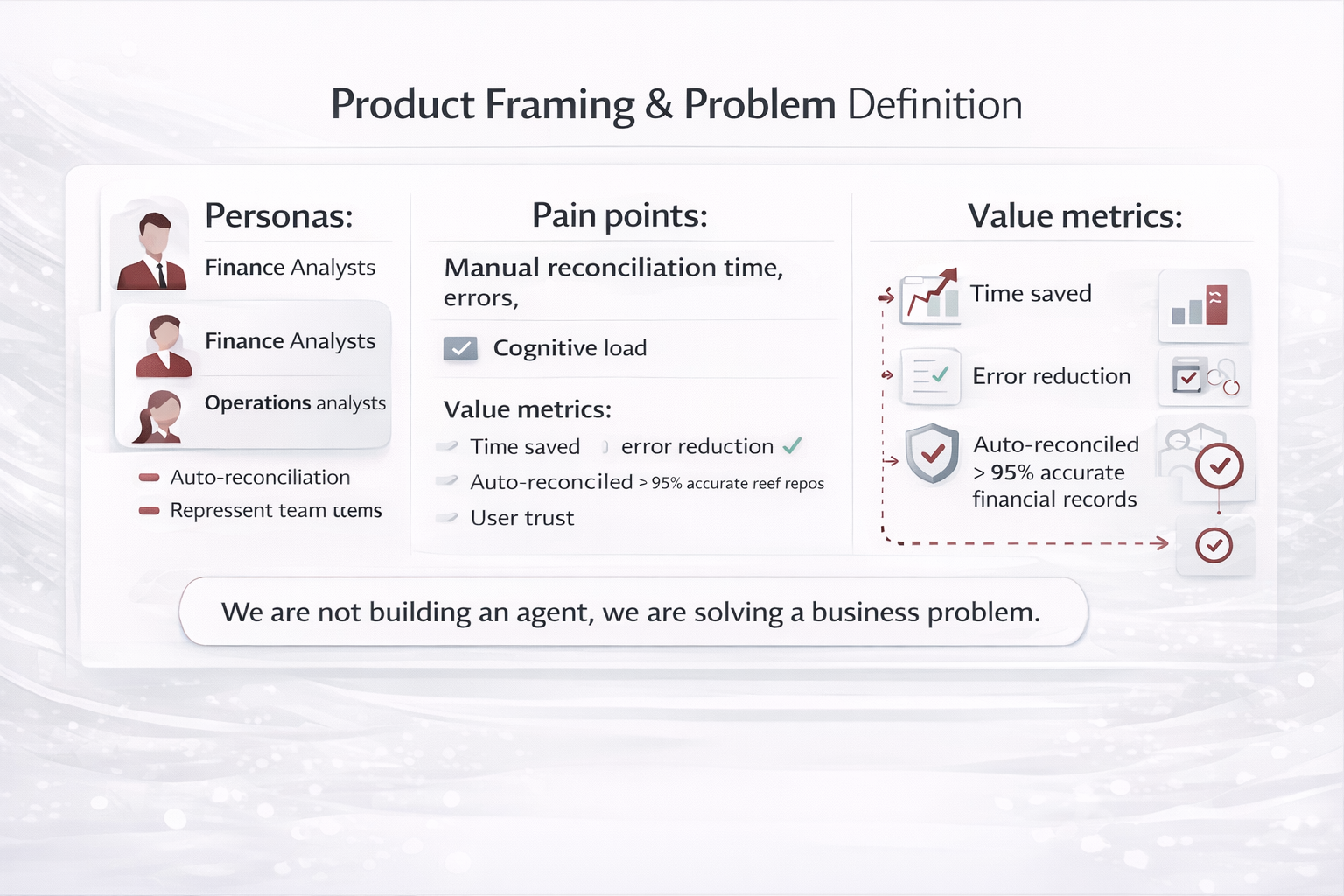
  • Primary users: finance analysts, operations analysts
  • Jobs-to-be-done: reconcile heterogeneous Excel files quickly and confidently
  • Success metrics: time saved, error reduction, % auto-reconciled, user trust
Patterns applied
Planning (define DoD, constraints) Reflection (risk/assumption review)
At this stage, “planning” is product planning: scope, constraints, and Definition of Done (DoD) that later becomes testable criteria.
Product framing diagram for Excel Reconciliation Agent

Figure — Value proposition & scope boundaries

This diagram captures what the agent will do (and will not do), the user persona(s), and measurable outcomes. It prevents “scope creep” and anchors later UX and evaluation design.

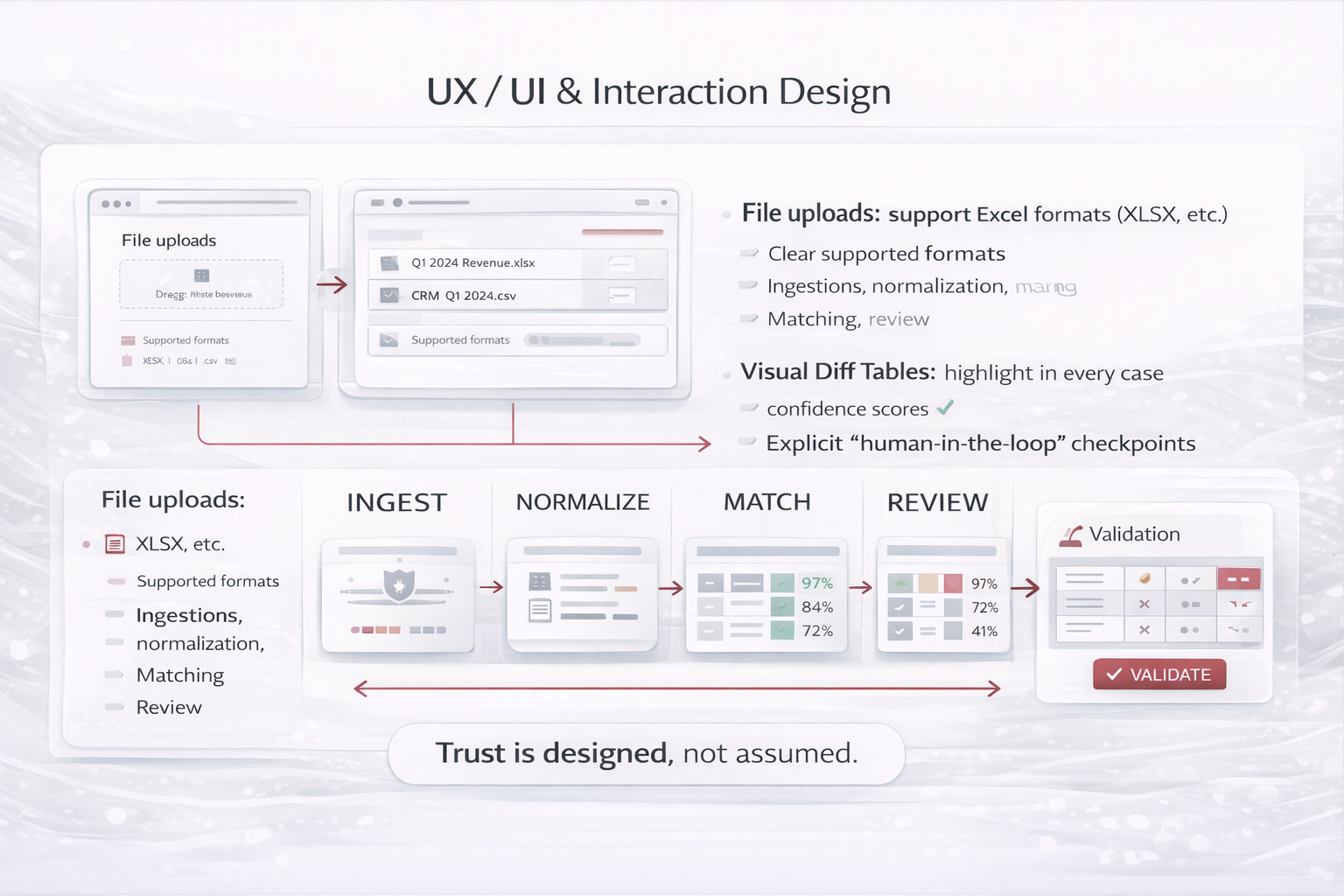
2) UX / UI & Interaction Design

Agents must be designed around progressive trust. Users should always understand what the agent is doing, what it is confident about, and where human validation is required.

  • File upload with clear supported formats and data privacy messaging
  • Step-by-step progress indicators (ingestion, normalization, matching, review)
  • Visual diff tables highlighting matches, mismatches, and confidence scores
  • Explicit “human-in-the-loop” checkpoints for low-confidence matches
UX patterns that build trust
  • Explainability: show “why this matched” (signals used)
  • Confidence bands: auto-accept (high), review (medium), reject/escalate (low)
  • Undo/rollback: users can revert exports or downstream writes
Patterns applied
Tool Use (upload, parse, export) Safety Gate (confirm writes)
UX is where you operationalize “Safety Gate”: confirmations, previews, and permission checks before irreversible actions.
UX flow for Excel Reconciliation Agent

Figure — Progressive trust UX flow

The UX flow makes the agent’s internal stages visible (ingest → normalize → match → review → export), and inserts human checkpoints only where confidence is insufficient.

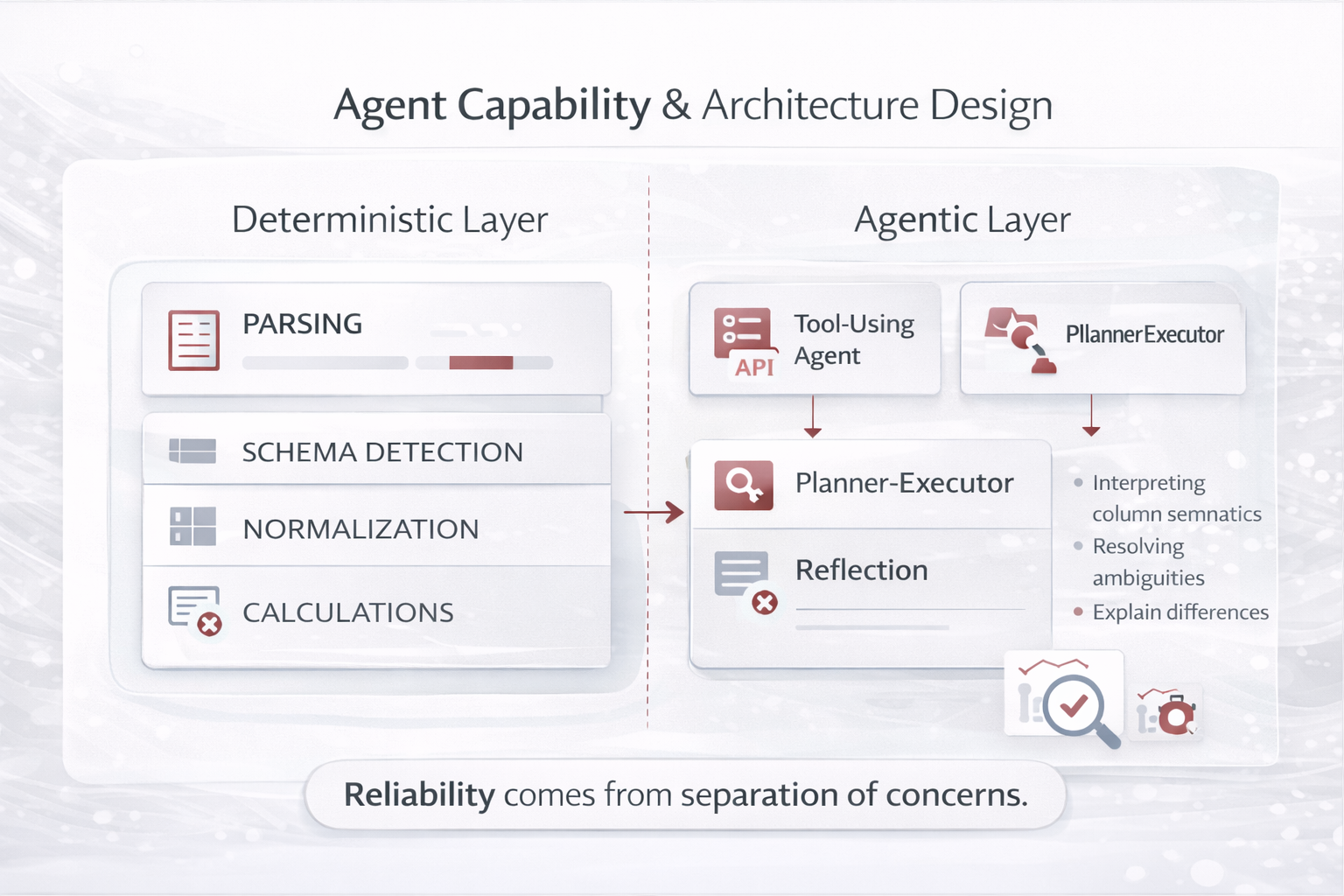
3) Agent Capability & Architecture Design

Decompose the agent into deterministic and non-deterministic components. This separation is critical for reliability and explainability. In reconciliation, the math and file IO are deterministic; the ambiguity resolution is where the LLM helps most.

  • Deterministic layer: file parsing, schema detection, normalization, calculations
  • Agentic layer: interpreting column semantics, resolving ambiguities, explaining differences
  • Design patterns used: Tool-Using Agent + Planner–Executor + Reflection
Architecture guidance
Keep the LLM on the “interpretation & decision support” plane, and keep the “data processing & calculations” plane deterministic. This improves accuracy, auditability, and cost control.
Patterns applied
Planner–Executor Tool Use Reflection (bounded)
Architecture decomposition for Excel Reconciliation Agent

Figure — Deterministic vs agentic responsibilities

This diagram is an extract of the full system: it shows which subproblems must be deterministic (parsing/calculation), which are agentic (semantic mapping/ambiguity resolution), and where checkpoints and logging live.

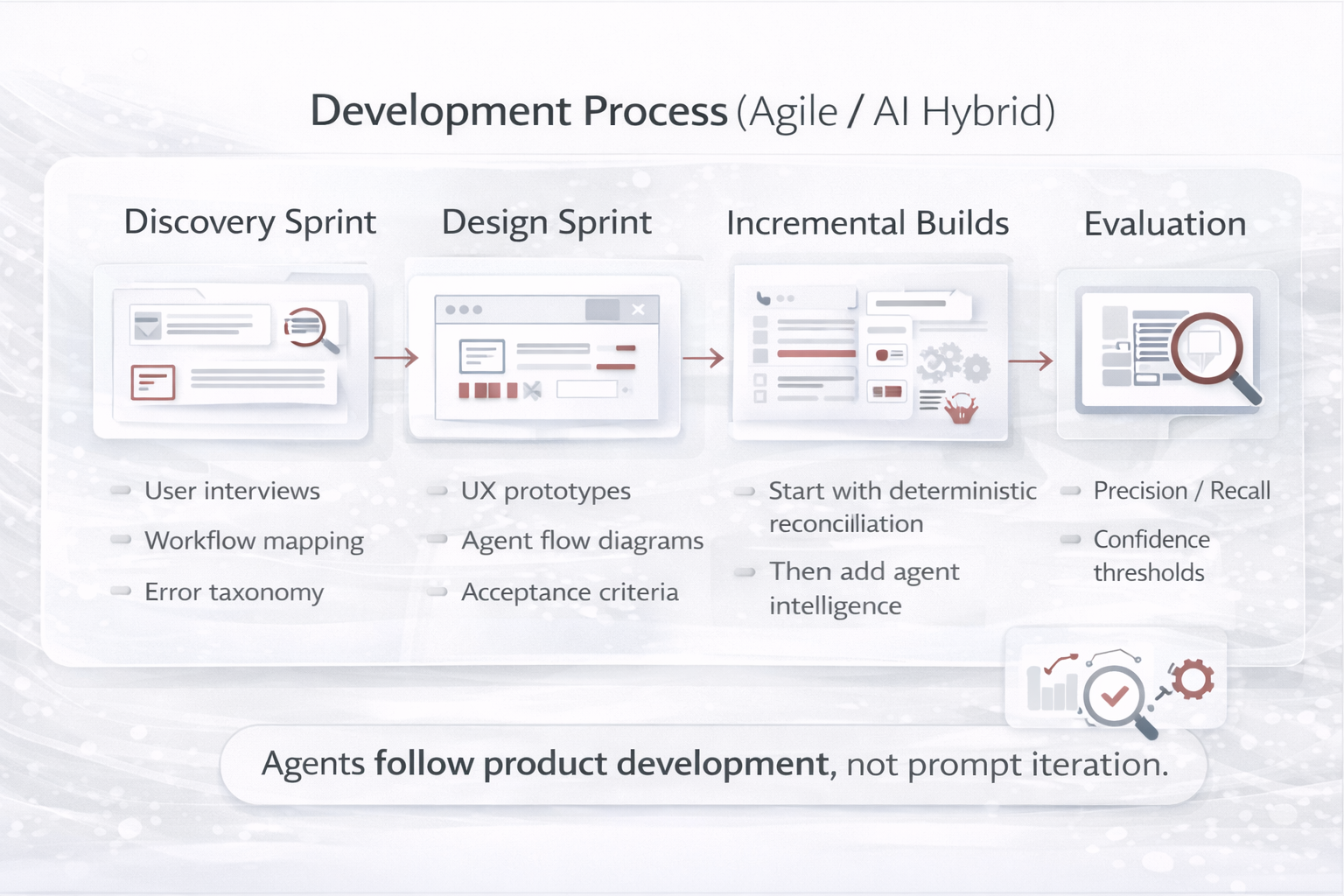
4) Development Process (Industry-Strong Model)

Use a hybrid approach: Agile product development for iterative delivery and stakeholder feedback, plus AI evaluation loops for reliability. Build the deterministic backbone first, then add agent intelligence.

Phase What you do Artifacts you produce
Discovery Sprint User interviews, workflow mapping, error taxonomy, data sampling Personas, journey map, acceptance criteria, dataset plan
Design Sprint UX prototypes, agent flow diagrams, tool schemas, guardrails Clickable prototype, sequence diagrams, tool contracts
Incremental Builds Deterministic reconciliation first, then agentic ambiguity resolver MVP → v1 → v2 backlog, release notes
Evaluation Loops Measure false positives/negatives, confidence thresholds, regressions Eval dashboards, golden sets, test reports
Agile + AI lifecycle process diagram

Figure — Agile delivery + AI evaluation loops

This diagram shows the dual-track loop: product increments ship frequently, while evaluation gates protect quality. It helps teams avoid “demo-only agents” by enforcing measurable progress and stability.

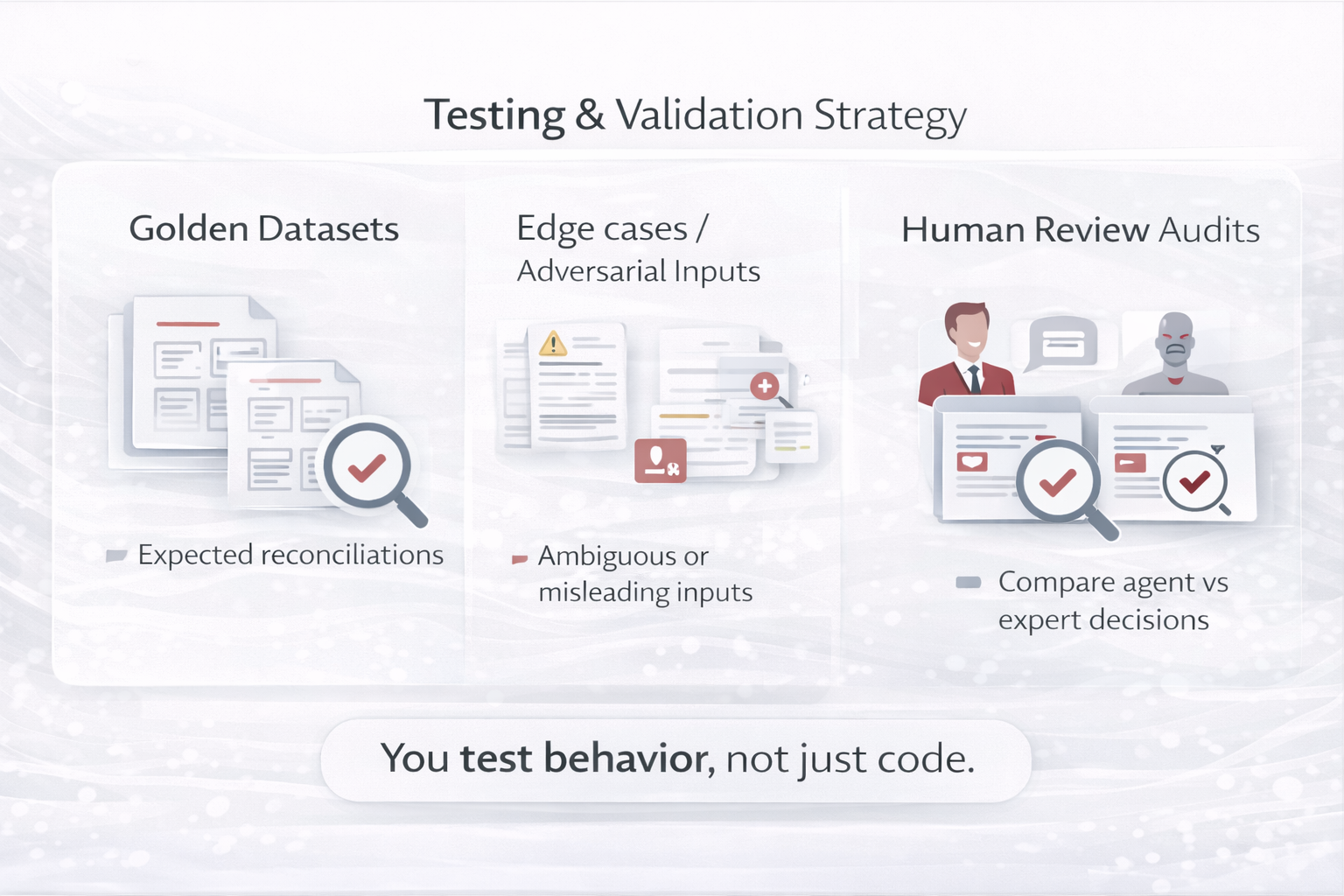
5) Testing & Validation Strategy

Testing an agent goes beyond unit tests. You must validate behavior, robustness, and trust—especially because input variability is the norm in Excel-based processes.

Testing layers
  • Deterministic tests: parsers, calculations, format conversions
  • Behavioral tests: matching decisions, explanations, confidence calibration
  • Safety tests: permissions, injection, data leakage, write protections
Patterns applied
Reflection (critic rubric) Deterministic Validation
Reflection is used here as a structured reviewer (rubric) and bounded iterations—paired with deterministic checks.
Testing and validation diagram for Excel Reconciliation Agent

Figure — Evaluation matrix and confidence thresholds

This figure is an extract of a full evaluation program: golden datasets define expected outcomes, confidence bands drive UX gates (auto-accept vs review), and audits compare agent decisions to expert baselines.

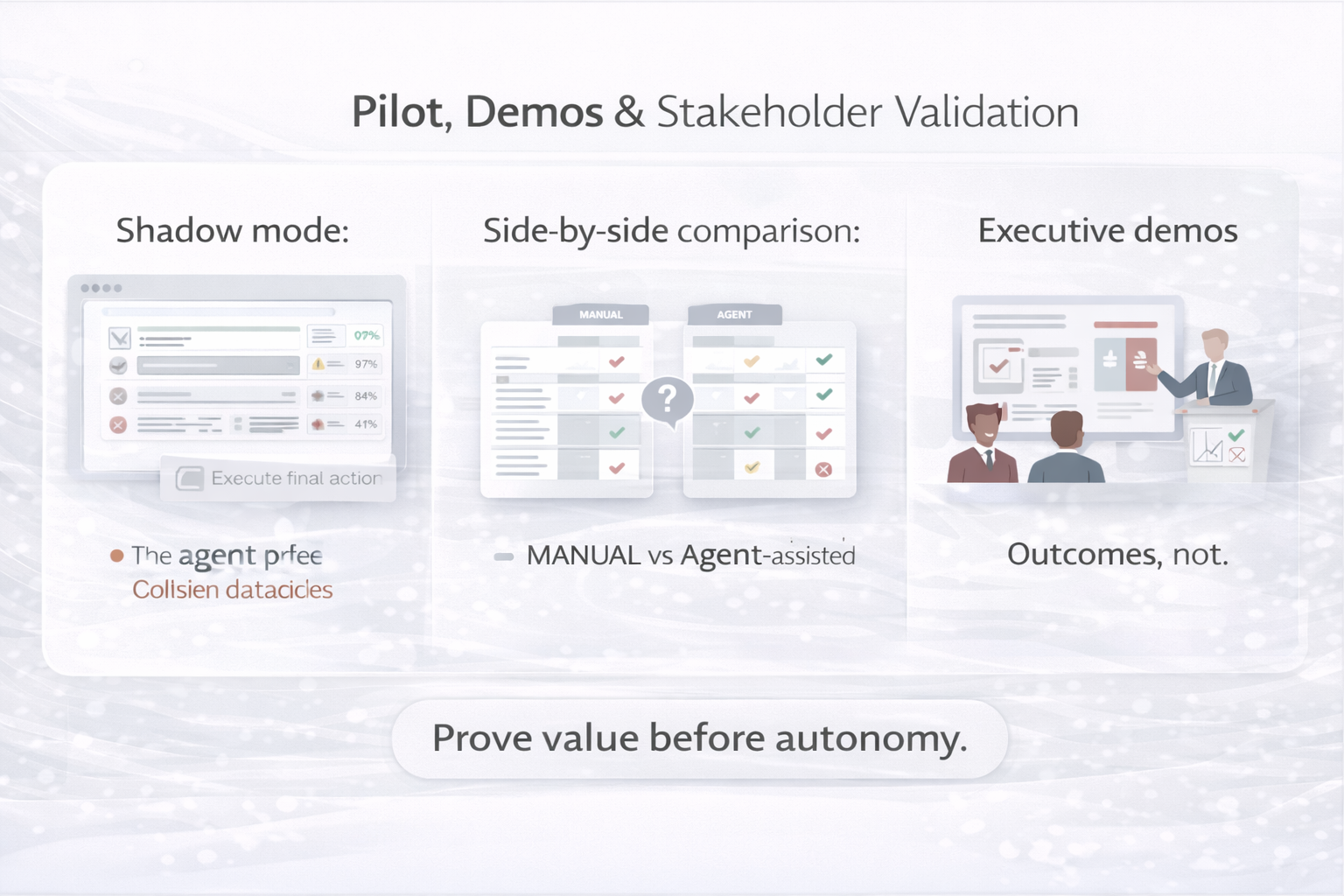
6) Pilot, Demos & Stakeholder Validation

Pilots should be run with real users and real data, but under controlled conditions. Strong pilots focus on evidence: accuracy, time saved, trust, and operational readiness.

  • Shadow mode: agent produces results without executing final actions
  • Side-by-side: manual vs agent-assisted reconciliation (time + error metrics)
  • Executive demos: outcome-first storytelling with traceability (what, why, evidence)
Pilot and demo approach diagram

Figure — Pilot design: shadow → assisted → controlled automation

This visual shows a staged adoption path: start in shadow mode, move to assisted mode with human approvals, and only then automate low-risk actions. It increases safety and stakeholder confidence.

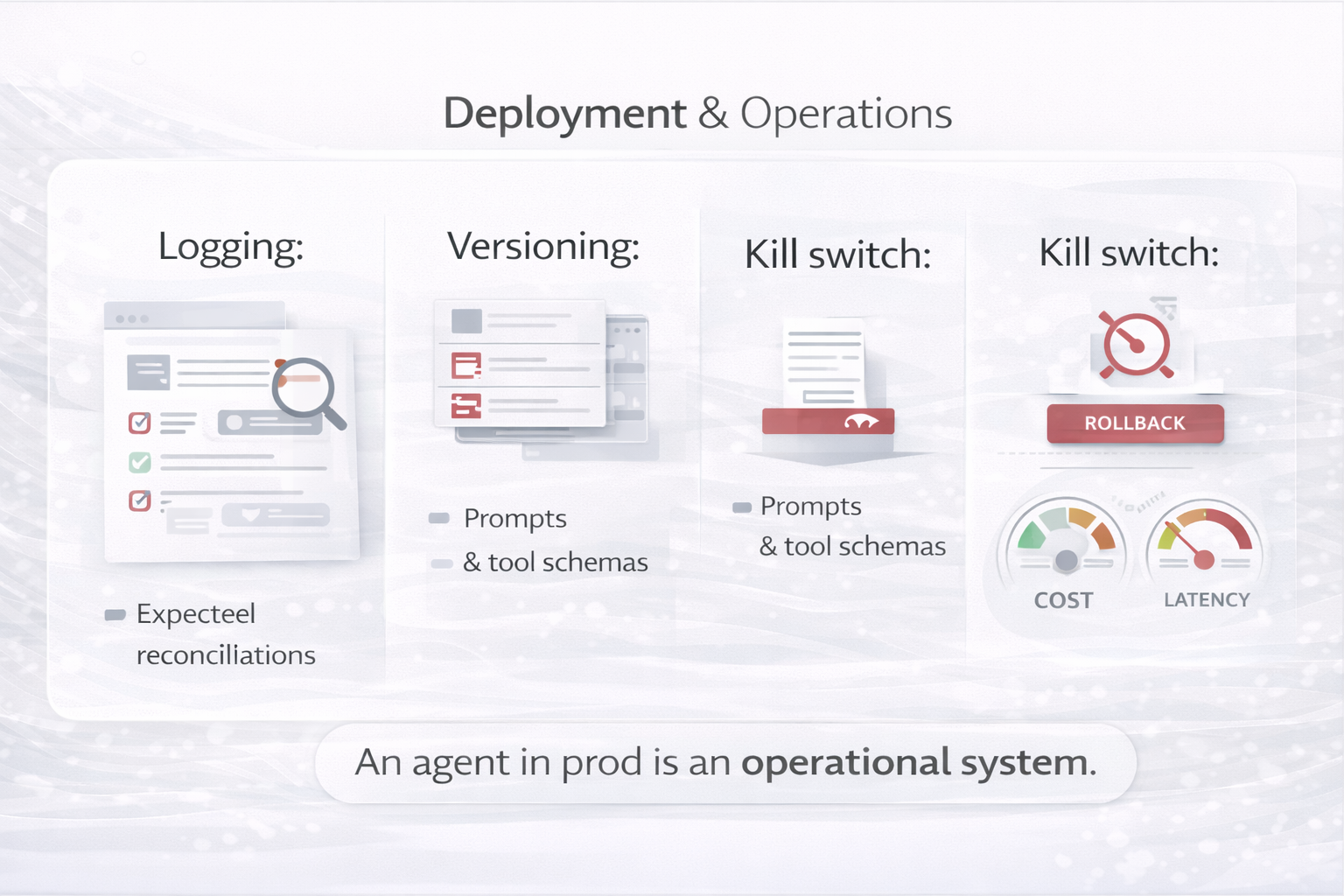
7) Deployment & Operations

Production deployment requires operational discipline. Agents must be observable and governable. Treat prompts, tool schemas, and workflows as versioned artifacts.

Operational controls
  • Versioned prompts and tool schemas
  • Logging of decisions, tool calls, and confidence levels
  • Rollback and kill-switch mechanisms
  • Cost and latency monitoring
Patterns applied
Safety Gate Tool Use (least privilege) Multi-agent (ops roles)
Deployment and operations diagram for AI agent

Figure — Production readiness: observability, governance, cost

This diagram is an extract of a full ops model: telemetry captures tool traces and outcomes, governance controls versions and permissions, and runtime monitoring detects drift, cost spikes, or abnormal behavior.

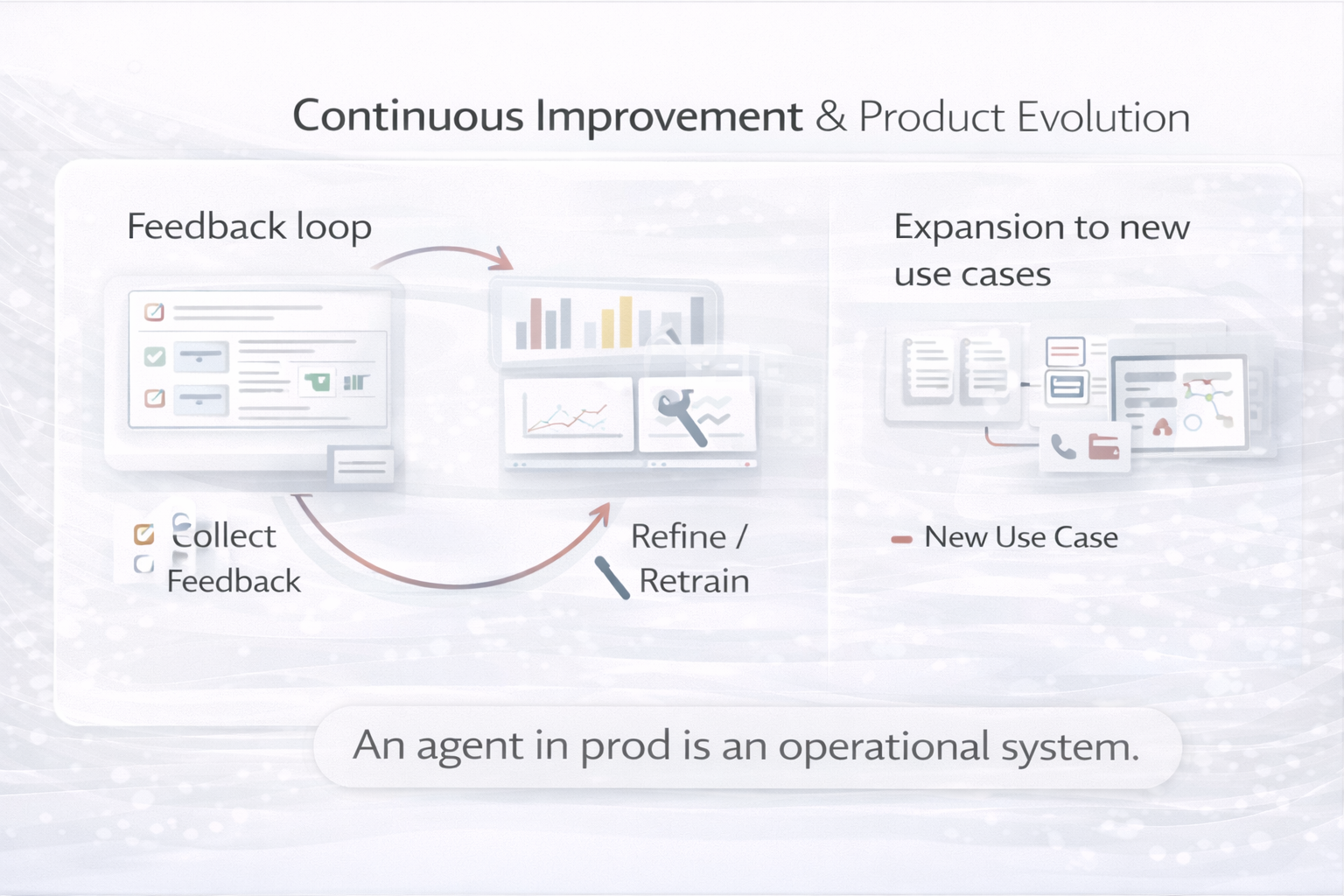
8) Continuous Improvement & Product Evolution

Successful agents are never “done.” They evolve based on user feedback, new data patterns, and changing business rules. Build feedback and learning loops into the product from day one.

Continuous improvement mechanisms
  • User feedback loops embedded in the UI (“Was this match correct?”)
  • Periodic prompt refinement and eval set expansion
  • Expansion to adjacent use cases (multi-file, multi-system reconciliation)
Patterns applied
Reflection (post-run review) Planning (roadmap iterations) RAG (policy updates)
Continuous improvement loop for AI agent product

Figure — Feedback → evaluation → iteration loop

This visual shows how product feedback becomes measurable improvements: feedback labels enrich evaluation sets, regressions are caught early, and the agent’s behavior evolves safely through versioned releases.

Key takeaway
Building an AI agent is a product journey. The strongest teams treat agents as long-lived digital products—combining UX design, engineering rigor, governance, and continuous evaluation. The result is an agent people trust, not just a demo.
5 — 1) Tool-Using Reactive Agent (Reflex + Tools)

1) Tool-Using Reactive Agent (Reflex + Tools)

1) Tool-Using Reactive Agent (Reflex + Tools)

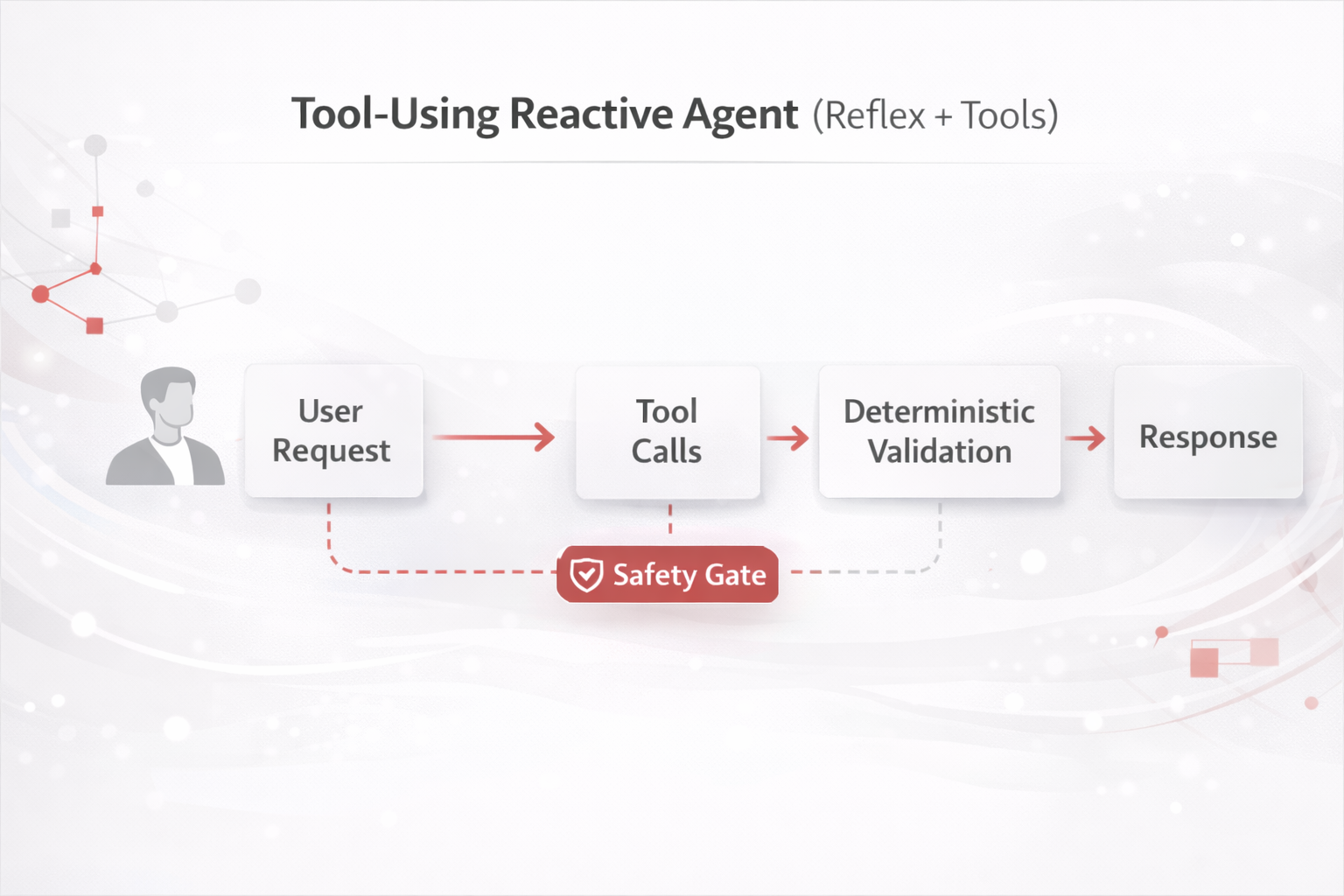
A fast agent that interprets a request and calls tools immediately (minimal long-horizon planning). Best for operational tasks and high-volume execution.

Design 1: Tool-Using Reactive Agent diagram

Figure — Reactive + Tools

This is a minimal viable agent loop: the agent routes intent and immediately calls one or more tools, then validates the results before responding. The diagram is an extract—in production you also add authentication, rate limits, audit logs, and permissions. The Safety Gate represents policy checks and/or confirmation before any write action (create/update/delete).

Best for
Ticket routing, “do X now” operations, structured API calls, deterministic workflows with messy inputs.
Watch-outs
Tool misuse, accidental writes, and confidence overreach (solve with allowlists + confirmations + validators).

Core components

  • Intent/router + entity extraction
  • Tool catalog with strict schemas
  • Deterministic validators for outputs
  • Write-action confirmations & least privilege
  • Audit logging of tool traces

Real-world examples

  • IT Ops: restart a service, verify health checks, record outcome in a ticket.
  • Customer Support: fetch last invoice from billing API and initiate resend workflow.
  • Finance Ops: pull daily spend from DW and flag anomalies with rule checks.
6 — 2) RAG + Tool Agent (Context-Grounded Action Agent)

2) RAG + Tool Agent (Context-Grounded Action Agent)

2) RAG + Tool Agent (Context-Grounded Action Agent)

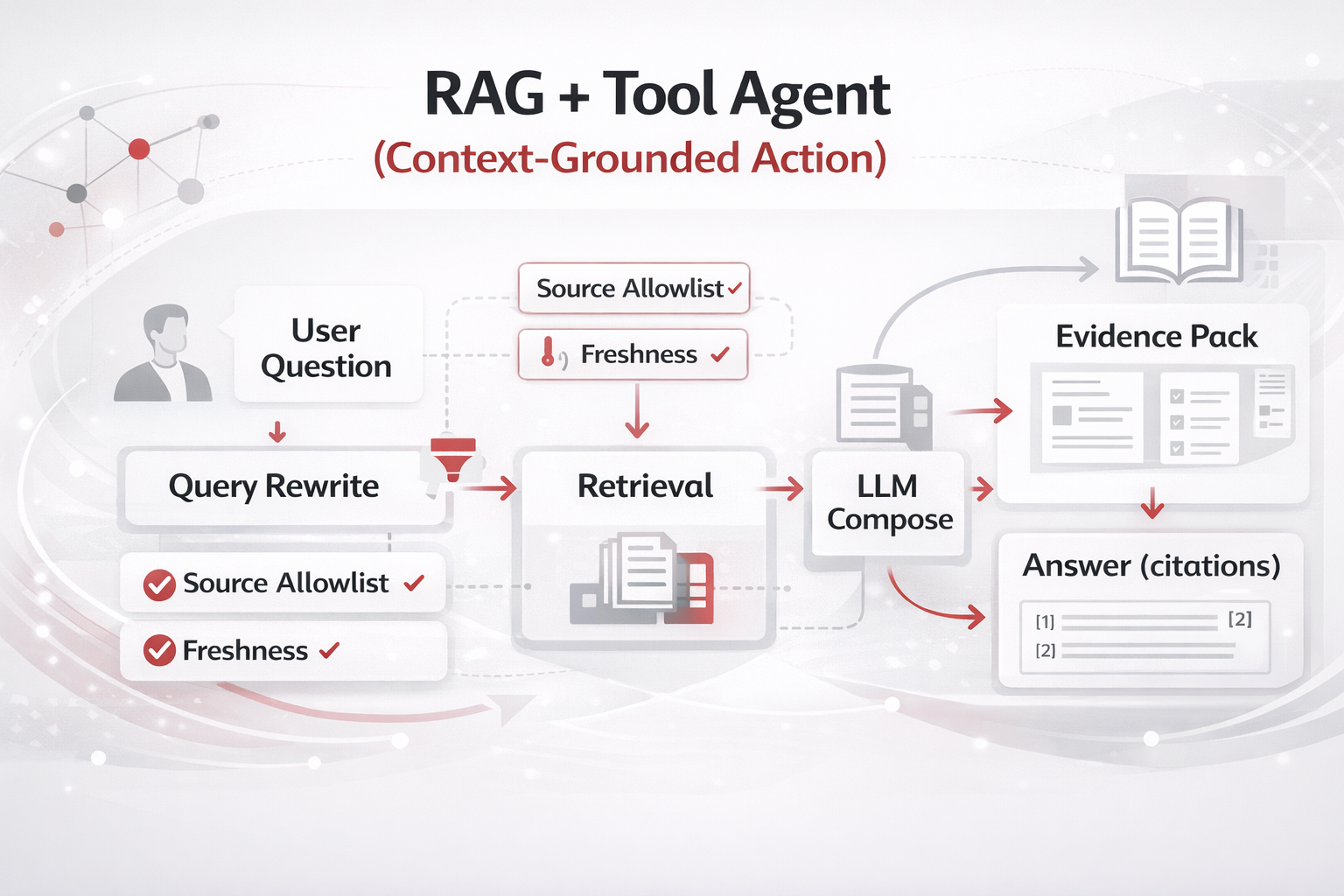
Adds retrieval (policies, SOPs, docs) before acting—so outputs are grounded and defensible. Ideal for compliance-heavy environments.

Design 2: RAG + Tool Agent diagram

Figure — Retrieval Grounding + Tools

This diagram highlights how an agent becomes defensible: it retrieves evidence (policies/SOPs/docs), composes an answer or plan grounded in that evidence, and then performs tool actions with traceability. It is an extract of a full RAG system: in practice you also include chunking/indexing, relevance thresholds, source allowlists, freshness/version rules, and citation capture so outputs can be audited.

Best for
HR policy Q&A, security exception workflows, SOP-guided field operations, regulated processes.
Watch-outs
Wrong retrieval or stale content (solve with freshness filters, source allowlists, and evaluation sets).

Core components

  • Retriever (search/vector) + chunking strategy
  • Citation/evidence tracker
  • Tool layer (tickets, approvals, systems)
  • Source allowlists and version/freshness rules
  • Fallback: “not found” with escalation path

Real-world examples

  • HR: remote work policy answer grounded in official policy sections + approval request.
  • Security: draft an exception request referencing control requirements + open a ticket.
  • Enablement: step-by-step calibration guidance from the latest SOP.
7 — 3) Planner–Executor Agent (Goal-Directed)

3) Planner–Executor Agent (Goal-Directed)

3) Planner–Executor Agent (Goal-Directed)

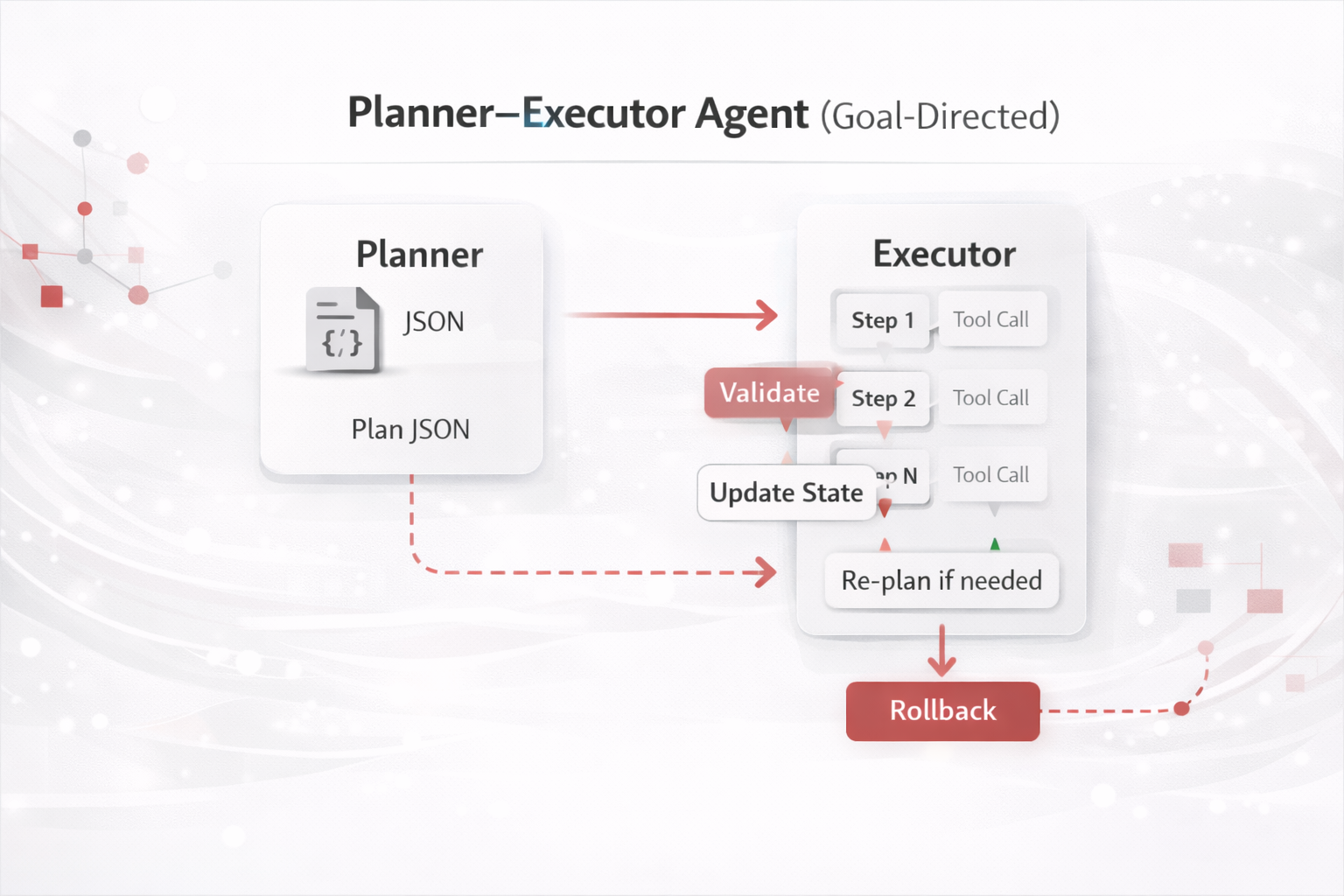
Separates planning from execution. The planner builds a structured roadmap; the executor runs steps with checkpoints and re-planning triggers. Best for multi-step work and program-like tasks.

Design 3: Planner–Executor Agent diagram

Figure — Planner → Executor with Checkpoints

This figure shows a two-layer control model: the Planner produces a structured Plan (often JSON), and the Executor runs steps with tool calls under checkpoints. The checkpoints (Validate → Update State → Re-plan) are where reliability is gained: errors, missing inputs, or constraint violations trigger a re-plan rather than silent failure. The Rollback branch indicates controlled reversal for risky writes.

Best for
Migrations, incident response, audits, onboarding workflows, multi-step analyses with dependencies.
Watch-outs
Over-planning or unrealistic plans (solve with feasibility checks, step-level validators, and bounded iterations).

Core components

  • Plan schema (JSON): steps, inputs/outputs, validation, rollback
  • State store: step results + decisions
  • Execution controller: timeouts, retries, kill-switch
  • Re-planning triggers: missing data, tool error, constraint violation

Real-world examples

  • Cloud migration: inventory → dependency map → cutover plan → execute → validate → post-mortem.
  • Data incident: detect → isolate scope → test fix → deploy → verify → RCA.
  • Procurement automation: requirements → shortlist → compliance → approvals → contract drafting.
8 — 4) Reflect–Critique–Revise Agent (Quality Gate / Self-Review)

4) Reflect–Critique–Revise Agent (Quality Gate / Self-Review)

4) Reflect–Critique–Revise Agent (Quality Gate / Self-Review)

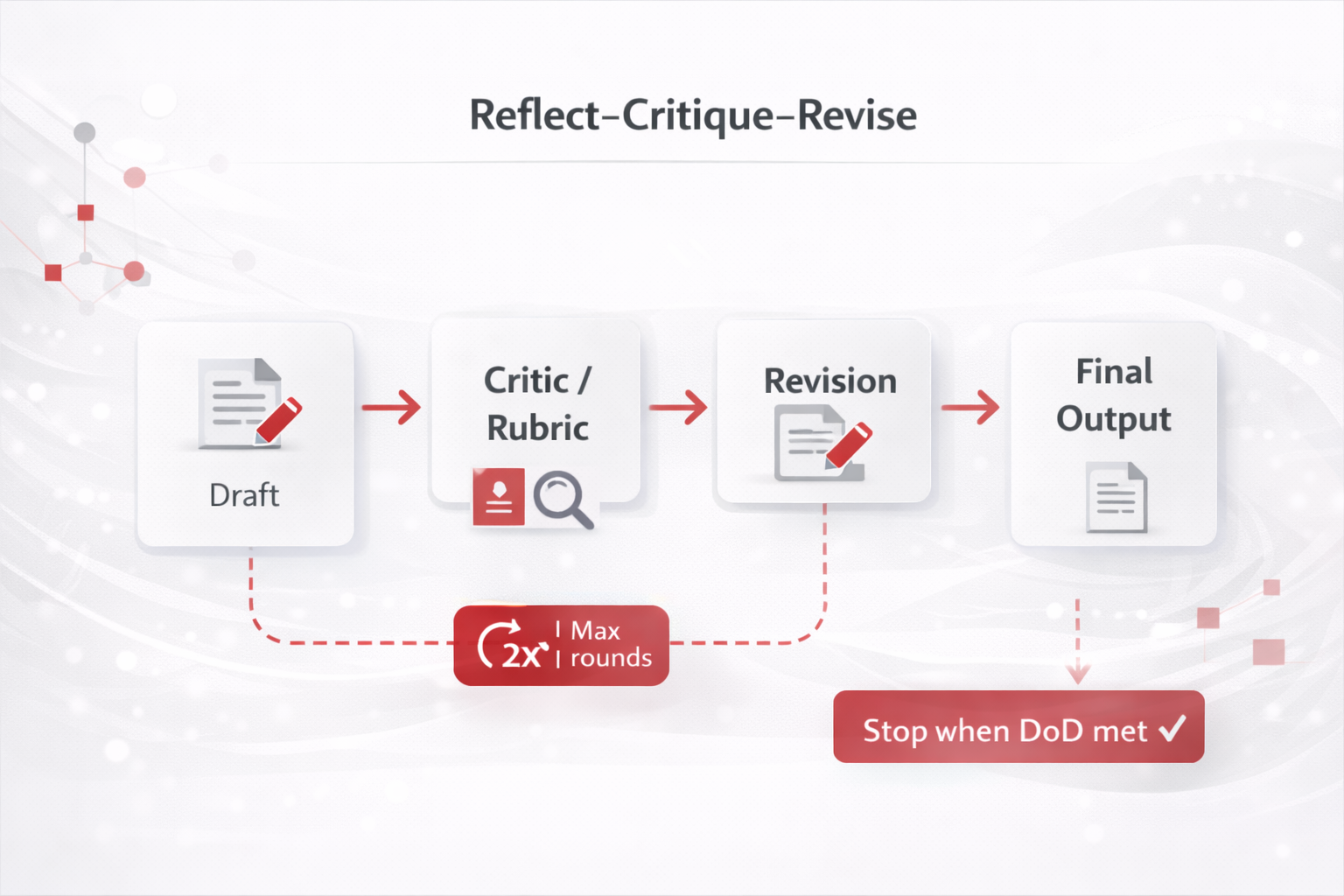
Adds a structured critique loop to improve quality and reduce errors. The critic can be the same model or a second “reviewer” agent. Best when output quality and risk are high.

Design 4: Reflect–Critique–Revise Agent diagram

Figure — Draft → Critique → Revise

This diagram represents a quality gate pattern. The Critic applies a rubric (accuracy, completeness, safety, constraints, tone) to a draft, and only then allows revision and finalization. It is an extract of the wider system: in real deployments you typically add scoring thresholds, deterministic checks (e.g., schema validation), and bounded iteration (Max 2 rounds) to control cost and avoid infinite loops.

Best for
Executive writing, compliance responses, high-stakes analysis, code generation with correctness requirements.
Watch-outs
Infinite iteration or cost blow-up (solve with max rounds + clear Definition of Done + deterministic checks).

Core components

  • Draft generator
  • Critic rubric (accuracy, completeness, safety, tone, constraints)
  • Revision step
  • Stop conditions (max rounds, threshold score)

Real-world examples

  • Leadership memo: draft → critic checks assumptions and missing decisions → revise with clarity.
  • Security response: propose controls → critic aligns to framework → revise with measurable actions.
  • Executive email: tone/clarity critic → revise for concise ask + next steps.
9 — 5) Supervisor + Specialist Multi-Agent (Orchestrated MAS)

5) Supervisor + Specialist Multi-Agent (Orchestrated MAS)

5) Supervisor + Specialist Multi-Agent (Orchestrated MAS)

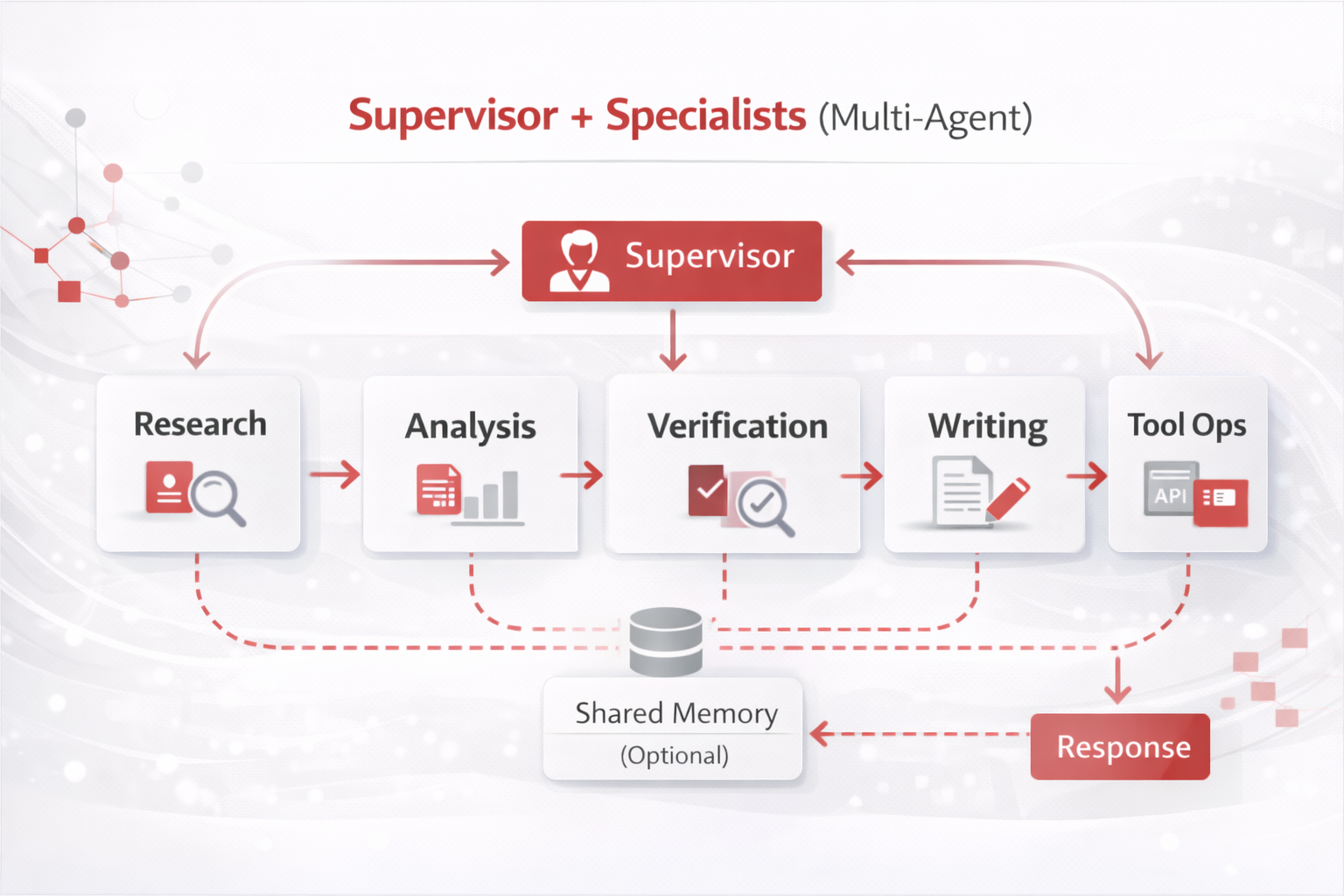
A supervisor decomposes work and delegates to specialized agents (researcher, analyst, verifier, writer, tool-operator). Best for complex work requiring parallel expertise and modularity.

Design 5: Supervisor + Specialists Multi-Agent diagram

Figure — Supervisor Orchestration

This is a coordination architecture: a Supervisor decomposes work, assigns it to specialists with narrow roles (research, analysis, verification, writing, tool ops), and then synthesizes the final answer. The Shared Memory hub represents a common workspace for artifacts (citations, intermediate notes, plans). The diagram is an extract—production systems also define schemas, arbitration rules, and timeouts to prevent drift or circular collaboration.

Best for
Due diligence, enterprise architecture proposals, governance programs, complex research and synthesis.
Watch-outs
Drift or misalignment between agents (solve with schemas, strict roles, attribution, and arbitration rules).

Core components

  • Supervisor with delegation policy
  • Specialists with narrow scopes + output schemas
  • Shared memory (“blackboard”) for artifacts
  • Aggregator: conflict resolution + final output
  • Timeouts and bounded collaboration

Real-world examples

  • Vendor due diligence: security agent + finance agent + legal agent → supervisor synthesizes risks.
  • Architecture: target architecture agent + risk agent + exec summary agent → unified proposal.
  • AI governance: policy agent + controls agent + training agent → operational program output.
10 — Live A/B Quiz — Agent Design Decisions

Live A/B Quiz — Agent Design Decisions

Live A/B Quiz — Agent Design Decisions

Use this interactive A/B quiz during class to discuss trade-offs. After each choice, the page reveals the recommended option and the rationale (patterns + agent type).

Case context
You are building an Excel Reconciliation Agent for finance operations. Inputs vary across regions and vendors. The goal is to reduce reconciliation time and errors while keeping auditability and safe rollout controls.
11 — Frequently Asked Questions (FAQ)

Frequently Asked Questions (FAQ)

Frequently Asked Questions (FAQ)

What is the difference between an AI agent and a traditional AI application?

A traditional AI application typically responds to a single input with a single output. An AI agent, by contrast, is goal-oriented, stateful, and iterative. It can plan, use tools, evaluate intermediate results, adapt its strategy, and operate across multiple steps to achieve an outcome.

Is building an AI agent mainly a prompt-engineering task?

No. Prompt engineering is only a small part of the system. Production-grade agents require product design, UX, architecture, deterministic processing, validation logic, observability, and governance. Treating agents as prompts leads to fragile and unscalable solutions.

Which agent design patterns are most accepted in the industry today?

Two families are widely accepted: (1) the classical AI agent taxonomy (reflex, goal-based, utility-based, learning), and (2) modern LLM agent patterns such as tool use, planning, reflection, and multi-agent coordination. Most real-world systems combine patterns from both families.

How do I choose the right agent architecture for my use case?

Start with the simplest viable pattern. If the task is deterministic, prefer rules and code. Add agentic capabilities only where interpretation, ambiguity, or reasoning is required. Complexity should be introduced incrementally, not upfront.

Why is separating deterministic logic from agentic reasoning so important?

Deterministic components provide reliability, repeatability, and auditability. Agentic components provide flexibility and interpretation. Mixing both without separation increases cost, reduces explainability, and makes failures harder to diagnose.

Do AI agents need a human-in-the-loop?

In most enterprise scenarios, yes. Human-in-the-loop mechanisms are essential for trust, regulatory compliance, and error recovery—especially during early stages and for high-impact decisions.

How do we measure success for an AI agent?

Success should be measured in business outcomes, not model metrics alone. Common indicators include time saved, error reduction, percentage of automated decisions, user trust, and cost-to-value ratios.

How is testing an AI agent different from testing traditional software?

In addition to unit and integration tests, agents require behavioral testing, edge-case evaluation, golden datasets, and human audits. You test not only correctness, but also consistency, robustness, and explainability.

What is a safe way to deploy an AI agent in production?

Start with shadow mode, where the agent generates outputs without executing actions. Progress to limited autonomy with guardrails, logging, rollback mechanisms, and cost controls. Full autonomy should be earned, not assumed.

How do AI agents evolve over time?

Successful agents are treated as living products. They evolve through user feedback, improved prompts, updated tools, refined rules, and expanded use cases. Continuous improvement is a core design principle.

Can a single agent architecture fit all use cases?

No. There is no universal agent architecture. Mature systems use modular designs and multiple agents, each optimized for a specific role, task, or level of autonomy.

What is the biggest mistake teams make when building AI agents?

The most common mistake is overestimating intelligence and underinvesting in product design, UX, controls, and governance. Agents fail not because models are weak, but because systems are poorly designed.

12 — Frequently Asked Questions (FAQ)

Frequently Asked Questions (FAQ)

Frequently Asked Questions (FAQ)

What is the difference between an AI agent and a traditional AI application?

A traditional AI application typically responds to a single input with a single output. An AI agent, by contrast, is goal-oriented, stateful, and iterative. It can plan, use tools, evaluate intermediate results, adapt its strategy, and operate across multiple steps to achieve an outcome.

Is building an AI agent mainly a prompt-engineering task?

No. Prompt engineering is only a small part of the system. Production-grade agents require product design, UX, architecture, deterministic processing, validation logic, observability, and governance. Treating agents as prompts leads to fragile and unscalable solutions.

Which agent design patterns are most accepted in the industry today?

Two families are widely accepted: (1) the classical AI agent taxonomy (reflex, goal-based, utility-based, learning), and (2) modern LLM agent patterns such as tool use, planning, reflection, and multi-agent coordination. Most real-world systems combine patterns from both families.

How do I choose the right agent architecture for my use case?

Start with the simplest viable pattern. If the task is deterministic, prefer rules and code. Add agentic capabilities only where interpretation, ambiguity, or reasoning is required. Complexity should be introduced incrementally, not upfront.

Why is separating deterministic logic from agentic reasoning so important?

Deterministic components provide reliability, repeatability, and auditability. Agentic components provide flexibility and interpretation. Mixing both without separation increases cost, reduces explainability, and makes failures harder to diagnose.

Do AI agents need a human-in-the-loop?

In most enterprise scenarios, yes. Human-in-the-loop mechanisms are essential for trust, regulatory compliance, and error recovery—especially during early stages and for high-impact decisions.

How do we measure success for an AI agent?

Success should be measured in business outcomes, not model metrics alone. Common indicators include time saved, error reduction, percentage of automated decisions, user trust, and cost-to-value ratios.

How is testing an AI agent different from testing traditional software?

In addition to unit and integration tests, agents require behavioral testing, edge-case evaluation, golden datasets, and human audits. You test not only correctness, but also consistency, robustness, and explainability.

What is a safe way to deploy an AI agent in production?

Start with shadow mode, where the agent generates outputs without executing actions. Progress to limited autonomy with guardrails, logging, rollback mechanisms, and cost controls. Full autonomy should be earned, not assumed.

How do AI agents evolve over time?

Successful agents are treated as living products. They evolve through user feedback, improved prompts, updated tools, refined rules, and expanded use cases. Continuous improvement is a core design principle.

Can a single agent architecture fit all use cases?

No. There is no universal agent architecture. Mature systems use modular designs and multiple agents, each optimized for a specific role, task, or level of autonomy.

What is the biggest mistake teams make when building AI agents?

The most common mistake is overestimating intelligence and underinvesting in product design, UX, controls, and governance. Agents fail not because models are weak, but because systems are poorly designed.

Rate this article

Share your feedback

Optional: send a comment about this article.